Best overall for narrated research slides: Microsoft PowerPoint. Best for template-led design: Canva. Best for recorded demonstrations: Camtasia. This 2026 guide compares the best video abstract tools for research papers by what you need to explain, edit, and share—not by promises of citations.
- Microsoft PowerPoint leads the best video abstract tools for research papers when narrated slides explain your findings clearly.
- Canva suits template-led video abstracts; Camtasia suits research demonstrations that need screen recording and editing.
- DaVinci Resolve suits detailed editing; OBS Studio suits recording rather than assembling a finished abstract.
- Paper Spotlight fits researchers seeking expert-led paper promotion, not a replacement for a video editor.
A video abstract explains a paper. Promotion gets that explanation in front of relevant readers. Paper Spotlight offers article analysis, targeted research promotion, and social media outreach; it is a separate decision from choosing your production tool.
Why this matters
For an early-career researcher, a video abstract needs to make the contribution understandable without overstating it. Attractive animation cannot correct a misleading explanation, and a polished export does not establish that the right researchers have seen it.
Separate your decisions: choose a tool that matches the material, then decide where and how to distribute the result. In 2026, the useful question remains practical: can a relevant researcher understand why your paper matters and find the published work?
A screen recording suits a software demonstration. Narrated slides suit a result that depends on a figure and explanation. Neither format is automatically better; the research determines the format.
What makes the best video abstract tools for research papers
Judge each tool against these criteria before choosing:
- Scientific accuracy: You need control over wording, figure labels, caveats, and the distinction between results and interpretation.
- Visual fit: The editor should support the material you actually have: slides, diagrams, screen demonstrations, or recorded footage.
- Revision control: Correcting a narration error or replacing a figure should not require rebuilding the entire video.
- Accessibility: Plan readable text, clear narration, captions, and a transcript. Confirm the workflow for each rather than assuming they are automatic.
- Production effort: Choose an interface you can learn and maintain alongside your research responsibilities.
- Publication readiness: Check the destination's current file requirements and your rights to every included asset before exporting.
Choose the simplest tool that preserves your scientific explanation. A sophisticated editor adds value only when its editing controls solve a real problem in your video.
Video abstract tools at a glance
These 2026 recommendations assign each tool a distinct role. The table compares production workflows, not citation outcomes.
| Tool | Best for | Standout feature | Key limitation |
|---|---|---|---|
| Microsoft PowerPoint | Narrated, slide-based abstracts | Slide design, narration recording, and video export | Complex audiovisual editing is not its primary purpose |
| Canva | Template-led visual explainers | Visual templates and browser-based video editing | Templates still need scientific and readability checks |
| Camtasia | Screen demonstrations with editing | Screen recording combined with a video-editing timeline | A recorded interface can distract from the research finding |
| DaVinci Resolve | Detailed audiovisual editing | Timeline editing, audio tools, and color controls | More editing complexity than a simple abstract needs |
| OBS Studio | Capturing research demonstrations | Configurable recording sources and scenes | Not a substitute for a full timeline editor |
1. Microsoft PowerPoint: best for narrated research slides
Microsoft PowerPoint lets you build slides, record narration, and export a presentation as a video. It fits papers whose explanation depends on a sequence of figures, diagrams, and clearly stated findings. Start here when you already explain your work through presentations.
PowerPoint keeps the scientific content close to familiar presentation materials. That is useful when a coauthor needs to check a figure or revise a conclusion before you record the final version. It also creates a risk: copying a conference talk without simplifying it produces a video that still feels like a lecture.
Microsoft PowerPoint pros:
- Reuses figures and diagrams already organized in slides.
- Supports narration within the presentation workflow.
- Makes individual slide revisions straightforward.
- Exports the presentation into a video format.
Microsoft PowerPoint cons:
- Detailed audiovisual editing calls for a separate editor.
- Dense slides remain difficult to read in a video.
- Long narrations need deliberate restructuring rather than cosmetic changes.
Best for: Researchers explaining a published finding through narrated figures and diagrams.
Verdict: Choose Microsoft PowerPoint as the default for a slide-based video abstract. Reduce each slide to the visual evidence and wording the audience needs; leave the fuller explanation in the paper.
2. Canva: best for template-led research explainers
Canva combines visual design templates with video-editing features. It suits researchers who want a consistent visual presentation without constructing every layout from scratch. Use it when the paper's contribution can be explained through short text, diagrams, images, and a controlled visual sequence.
The template is a starting point, not scientific guidance. Replace decorative elements that compete with the finding, and check whether a layout leaves enough room for a meaningful axis label or necessary qualification. Consistent design should make the explanation easier to follow, not make every study look interchangeable.
Canva pros:
- Provides starting layouts for visual explainers.
- Combines text, images, and video within a design workflow.
- Supports a consistent appearance across scenes.
- Helps organize an explanation around visual sections.
Canva cons:
- Generic layouts do not account for scientific nuance.
- Decorative motion can distract from data interpretation.
- Detailed audiovisual work requires checking whether its controls meet your needs.
Best for: Researchers whose main production challenge is organizing a clear visual explanation.
Verdict: Choose Canva for template-led design, but review every scene for scientific accuracy. Reject a layout if it forces you to remove an important caveat or shrink a figure beyond readability.
3. Camtasia: best for edited research demonstrations
Camtasia combines screen recording with timeline-based video editing. It fits a paper that needs to show a software workflow, computational interface, or other on-screen demonstration. The recording and editing workflow lets you remove irrelevant actions and connect the demonstration to an explanation.
A demonstration should show evidence for the contribution, not simply document every action. Decide which screen activity supports the paper's central finding before recording. Remove private information, unrelated windows, and interface details that the intended audience does not need.
Camtasia pros:
- Combines recording and editing in the same production workflow.
- Supports cutting and arranging recorded material.
- Provides annotations for directing attention.
- Fits explanations that depend on visible screen activity.
Camtasia cons:
- Requires learning timeline editing alongside recording.
- Detailed interfaces are hard to follow at small viewing sizes.
- A tutorial-style recording can obscure the scientific contribution.
Best for: Researchers whose published work needs a concise, edited screen demonstration.
Verdict: Choose Camtasia when the demonstration is essential to understanding the paper. Skip the interface tour; show the action, explain its significance, and return to the research finding.
4. DaVinci Resolve: best for detailed audiovisual editing
DaVinci Resolve is a video-editing application with tools for timeline assembly, audio work, and color adjustment. It suits an abstract that combines different kinds of recorded material and needs careful editing. Choose it when basic slide export or template editing leaves a specific production problem unresolved.
The additional controls create additional decisions. You must manage the sequence, audio, graphics, and export without allowing production work to displace scientific review. A technically polished video still needs a plain statement of the research question and the study's limitations.
DaVinci Resolve pros:
- Supports detailed timeline editing.
- Combines video, audio, and graphics in an editing workflow.
- Provides controls for audio and color adjustments.
- Fits projects assembled from varied source material.
DaVinci Resolve cons:
- Introduces more complexity than a narrated slide deck.
- Requires time to learn editing and export controls.
- Production choices can consume effort better spent clarifying the explanation.
Best for: Researchers or collaborators who need detailed control over a mixed-media abstract.
Verdict: Choose DaVinci Resolve for a defined editing need, not because a research video must look cinematic. Keep the scientific message as the organizing principle for every cut.
5. OBS Studio: best for capturing research demonstrations
OBS Studio records video using configurable sources and scenes. It is useful for capturing screen activity and arranging recording inputs before production. Treat it as a capture tool rather than a complete video-abstract workflow.
Recording is only part of the job. You still need a script, a plan for accessible presentation, and a way to remove mistakes or assemble separate takes. Test what appears in the recording before capturing material intended for public release.
OBS Studio pros:
- Supports screen and other recording sources.
- Lets you configure scenes for different views.
- Separates capture setup from later editing decisions.
OBS Studio cons:
- Does not replace a full timeline editor.
- Requires deliberate source and recording configuration.
- Leaves scientific sequencing and revision to your wider workflow.
Best for: Researchers who need configurable recording before editing elsewhere.
Verdict: Choose OBS Studio for capture; skip it as your only abstract-production tool when you need substantial editing. Decide how you will finish the video before recording.
How we ranked these tools
The ranking prioritizes scientific control, fit with research materials, revision effort, accessibility planning, and publication readiness. Microsoft PowerPoint leads because narrated slides provide a direct route from research figures to an explainable video; the other tools address distinct production needs.
This is a workflow-based 2026 recommendation, not a claim that any editor increases citations. Check current features and institutional access before committing to a production method.
Build the explanation before opening the editor
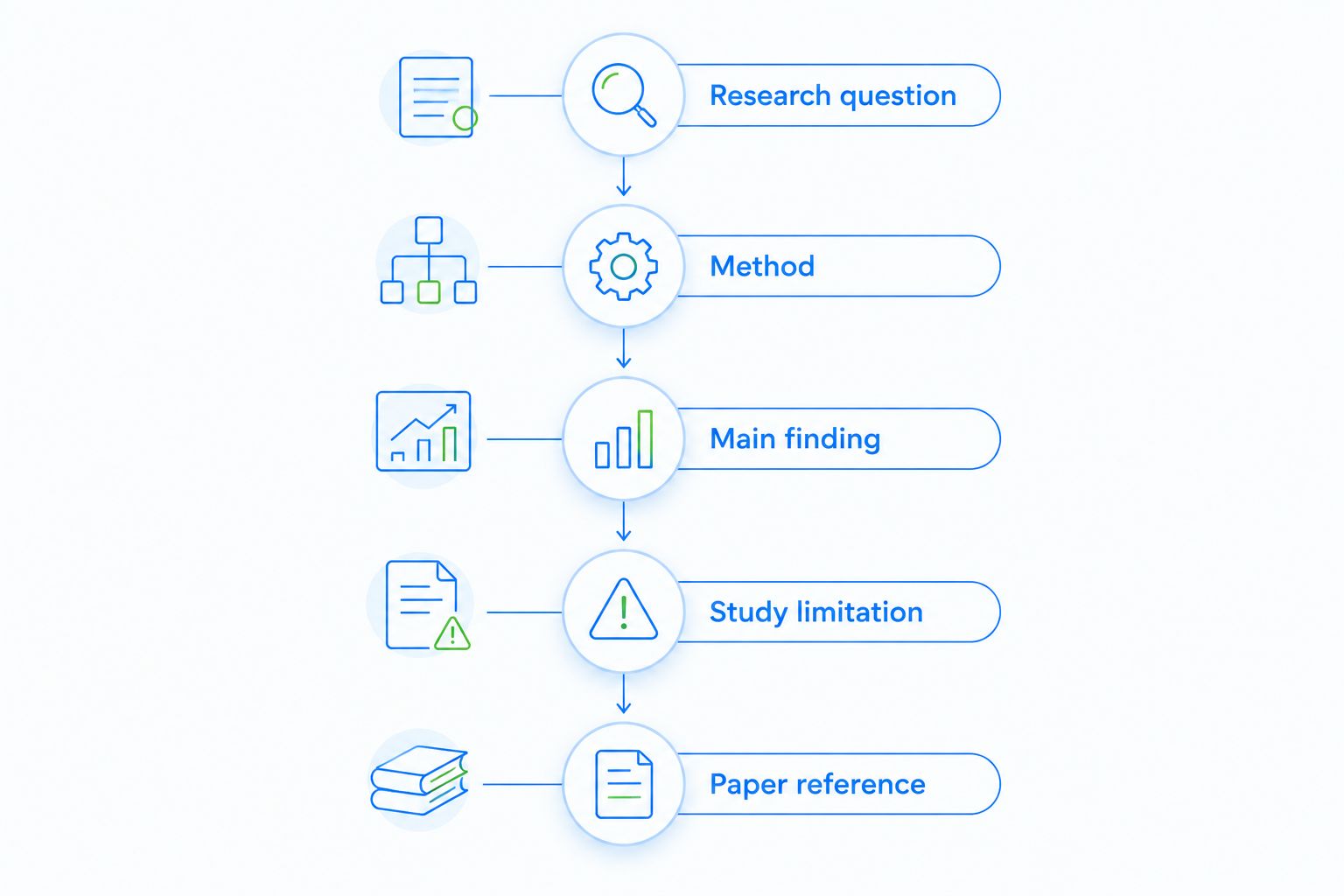
Use this sequence to prepare the script. Each part should earn its place by helping a relevant reader understand the published paper.
- Research question: State the problem the paper addresses in language the intended audience understands.
- Method: Explain the approach needed to interpret the finding, without reproducing the full methods section.
- Main finding: Present the central result and show the figure or demonstration that supports it.
- Study limitation: Include the qualification that prevents the audience from drawing an unsupported conclusion.
- Paper reference: Identify the published work and direct viewers to a legitimate place to read it.
Review the script before adding animation. If the main finding needs more explanation, revise the wording or visual rather than adding decoration.
Check the finished video in the format your audience will encounter. Read every visible label, listen without watching, and watch with the sound muted. These checks reveal different explanation and accessibility problems; none replaces a coauthor's scientific review.
Choose a promotion plan separately from a video tool
Paper Spotlight is best for researchers who want expert-led, targeted promotion of a published paper. Its PhD-founded perspective connects article analysis before promotion with expert-led targeting of relevant researchers.
The service's approach includes scientific testing of outreach approaches across research areas and career stages. That describes its method, not a promised result for your paper. Do not interpret promotion as publication, peer review, or a guaranteed citation outcome.
Before choosing a 2026 promotion plan, distinguish production from distribution. Decide what you will prepare yourself, which audience you want to reach, and how the service will explain its proposed targeting. Confirm whether your planned video fits that outreach rather than assuming video production is included.
Paper Spotlight's fit: Article analysis, targeted research promotion, and social media outreach for a published paper.
Paper Spotlight's limits: Promotion does not replace scientific quality, and it is not a video-editing application. Citation decisions remain with researchers who read and use the work.
Explore targeted paper promotion
Review the service, then assess how article analysis and outreach fit your published paper.
Which video abstract tool should you choose?
Choose Microsoft PowerPoint if you are undecided and your paper can be explained with narrated slides. Use Canva for template-led visual organization, Camtasia for edited screen demonstrations, DaVinci Resolve for detailed audiovisual work, and OBS Studio for recording inputs.
For your 2026 abstract, select the tool after writing the explanation. Your hardest task is making the contribution clear without overstating it; the editor should support that task rather than create a new production project.
FAQ
What's the best video abstract tool for research papers?
Microsoft PowerPoint is the best default for a narrated, slide-based research abstract. It supports slide preparation, narration recording, and video export. Choose another tool when demonstrations or detailed editing are essential.
Is Canva better than PowerPoint for a video abstract?
Canva is better suited to template-led visual design, while Microsoft PowerPoint fits narrated research slides. Choose based on the material you need to explain, not decorative effects. Both require scientific review of the finished video.
Can I make a video abstract with OBS Studio?
OBS Studio can capture material for a video abstract, but it is not a substitute for a full timeline editor. Plan a separate editing workflow when you need to arrange takes, remove errors, or combine recordings.
What should I include in a research video abstract?
Include the research question, the method needed to understand the result, the main finding, an important limitation, and the paper reference. Keep the explanation faithful to the published work. Remove background detail that does not help the intended audience interpret the contribution.
Do video abstracts guarantee more citations?
No, a video abstract does not guarantee more citations. It gives you another way to explain a published paper, while citation decisions depend on researchers finding, reading, and using the work. Do not treat viewing activity as evidence of citation impact.
Does Paper Spotlight replace a video abstract tool?
No, Paper Spotlight provides academic paper promotion rather than video editing. Its service includes article analysis, targeted research promotion, and social media outreach. Choose your production tool separately and confirm how your materials fit the proposed promotion.
How do I choose a video abstract tool in 2026?
Choose a video abstract tool by matching its workflow to your research material and revision needs. Check current recording, editing, accessibility, and export capabilities before starting. Institutional access and the destination's submission requirements also affect the decision.
One last thing
Write the study's most important limitation into the script before you record. If that qualification makes the headline less dramatic, keep the qualification and change the headline. Credible visibility depends on readers recognizing the published finding—not a stronger claim created for promotion.