
Best overall for a controlled first draft: ChatGPT. Best for audience-specific rewrites: Claude. Best for readability checks: Hemingway Editor. This 2026 guide compares the best plain language summary tools for research papers, separates drafting from checking, and explains when Paper Spotlight research promotion belongs after the writing process—not in place of it.
- ChatGPT is the best default for plain language summary drafting when you supply the source and check every claim.
- Claude suits audience-specific rewrites; Hemingway Editor helps identify difficult sentences, not scientific errors.
- Grammarly supports language polishing; Microsoft Word supports coauthor review and tracked revisions.
- Paper Spotlight offers research promotion after article analysis; it is not a substitute for scientific review.
Why this matters
A plain-language summary should help someone outside your specialty understand what you studied, what you found, and what the findings do not establish. Replacing technical words is only part of that job. You also need to preserve the study’s population, methods, uncertainty, and limits.
For early-career researchers choosing tools in 2026, the useful distinction is drafting assistance versus scientific responsibility. A readable paragraph can still misrepresent your paper. Choose tools around the work you need done, then keep authors responsible for the final claims.
Start with the intended reader. A summary for a researcher in an adjacent field needs different background from a summary for a patient, policymaker, or member of the public.
What makes the best plain-language summary tool?
Use these criteria before choosing a tool:
- Source fidelity: Can you work from the actual findings and preserve qualifications rather than expand on the topic generally?
- Audience control: Can you specify what the reader knows and which terms need explanation?
- Editable output: Can you revise wording, compare versions, and reject an inaccurate simplification?
- Readability feedback: Does the tool help identify dense sentences, jargon, or unnecessary complexity?
- Author review: Does the workflow let a coauthor check the summary against the published paper?
- Data handling: Can you use the tool in accordance with your institution’s rules and the material’s permissions?
Choose for the weakest part of your current workflow, not the longest feature list. If your draft already exists, a readability editor or tracked-review document can be more useful than another text generator.
Plain-language summary tools at a glance
These 2026 recommendations assign each tool a distinct role. The ranking is a workflow decision, not a claim that any tool produces scientifically validated summaries without review.
| Tool | Best for | Standout function | Key limitation |
|---|---|---|---|
| ChatGPT | Controlled first drafts | Rewriting supplied text under explicit instructions | Generated claims need source checking |
| Claude | Audience-specific rewrites | Revising explanations through conversational instructions | Fluent wording does not establish accuracy |
| Hemingway Editor | Sentence-level readability | Highlighting difficult prose and writing patterns | Does not verify research findings |
| Grammarly | Language polishing | Grammar, clarity, and wording suggestions | Suggested edits need scientific judgment |
| Microsoft Word | Coauthor signoff | Track Changes and comments | Authors must perform the simplification |
1. ChatGPT: best for controlled first drafts
ChatGPT generates and revises text from your instructions. For a research summary, give it an approved source passage and define the reader, purpose, and boundaries before asking for a draft.
The useful starting instruction is not simply “summarize this paper.” Ask ChatGPT to explain the research question, describe the finding in everyday language, and retain the limitations. Specify that it must not add applications, causal claims, or advice absent from the supplied text.
ChatGPT pros:
- Supports iterative rewriting when a sentence remains too technical.
- Accepts explicit instructions about audience and structure.
- Can explain terminology alongside a draft.
- Lets you request alternative wording for a difficult passage.
ChatGPT cons:
- Can introduce unsupported claims or omit important qualifications.
- Does not replace an author’s check against the methods and results.
- Requires attention to institutional rules before you share sensitive material.
Best for: Researchers who need a starting draft and can verify it against the paper.
A useful review habit is to underline every factual claim in the output. Match each claim to the paper before you polish the prose; otherwise, you risk making an inaccurate explanation more persuasive.
Verdict: Use ChatGPT for the first draft; hold publication until an author approves the claims.
2. Claude: best for audience-specific rewrites
Claude generates and revises explanations through conversational instructions. Its role here is to adapt an author-checked summary for a clearly defined reader, rather than create a new account of the study from memory.
Give Claude the same core findings when comparing versions. Ask for one explanation for an adjacent-field researcher and another for a public audience, then inspect where the wording changes the meaning. Different vocabulary is appropriate; different findings are not.
Claude pros:
- Supports audience-specific instructions and follow-up revisions.
- Can reorganize a draft around the reader’s questions.
- Offers alternative explanations of technical language.
- Helps you compare different narrative structures.
Claude cons:
- Can produce plausible wording that exceeds the source material.
- Audience adaptation can remove qualifications that still matter.
- Needs author review even when the draft reads naturally.
Best for: Researchers adapting an accurate summary for readers with different background knowledge.
Write the audience description concretely. “A reader who understands basic biology but not this laboratory method” gives a clearer brief than “make it accessible.” Explain which terms the reader must learn rather than asking Claude to remove every specialist term.
Verdict: Use Claude for audience adaptation; skip any rewrite that changes the study’s scope.
3. Hemingway Editor: best for sentence-level readability
Hemingway Editor highlights writing patterns such as difficult sentences, passive voice, and adverbs. Use that feedback to locate passages that need attention after you have drafted an accurate summary.
It is a readability editor, not a scientific summarizer. A highlighted sentence asks you to reconsider the writing; it does not prove that the sentence is wrong or that a shorter replacement is better.
Hemingway Editor pros:
- Makes dense passages easier to locate during revision.
- Provides visible feedback on sentence complexity.
- Encourages you to examine unnecessary wording.
- Supports a focused editing pass without generating a whole new account.
Hemingway Editor cons:
- Does not check a summary against your paper.
- Readability feedback cannot judge whether technical terms are necessary.
- Shorter sentences can still contain misleading claims.
Best for: Researchers whose summary is accurate but difficult to read.
Keep essential scientific distinctions. Replacing “associated with” with “caused” makes the sentence simpler but changes the claim; removing a population description can make a finding sound universal. Treat every simplification as an editorial decision, not an instruction you must accept.
Verdict: Use Hemingway Editor for readability checks; skip edits that remove necessary precision.
4. Grammarly: best for language polishing
Grammarly provides writing assistance, including grammar and clarity suggestions. Its place in this workflow is the final language pass on a summary whose findings and limitations have already been checked.
Separate corrections from substantive rewrites. Fixing punctuation is different from replacing a cautious verb, changing emphasis, or removing an explanation of uncertainty. Review those changes individually rather than accepting every suggestion together.
Grammarly pros:
- Helps identify grammatical problems and awkward phrasing.
- Offers wording suggestions you can review selectively.
- Supports polishing an existing draft rather than starting again.
- Gives you another opportunity to notice unclear sentences.
Grammarly cons:
- Does not establish whether a research statement is correct.
- A suggested rewrite can change technical meaning or emphasis.
- Language feedback does not replace feedback from the intended reader.
Best for: Researchers preparing an author-checked summary for public-facing use.
Pay particular attention to verbs describing the findings. “Suggests,” “estimates,” and “demonstrates” are not interchangeable. The final wording should reflect what the study design and evidence support, even if a language suggestion sounds more confident.
Verdict: Use Grammarly for selective language polishing; hold any edit that changes the strength of a claim.
5. Microsoft Word: best for coauthor signoff
Microsoft Word supports comments and Track Changes, which let authors inspect proposed edits and discuss wording. It belongs in this list as a review tool, not as an automatic plain-language summary generator.
Use a shared review document to separate scientific corrections from readability preferences. A coauthor can flag an overstated result while another reviewer identifies a term that needs explanation. Keep those decisions visible until the summary is approved.
Microsoft Word pros:
- Shows revisions through Track Changes.
- Supports comments attached to specific passages.
- Lets authors accept or reject proposed edits.
- Keeps discussion close to the wording under review.
Microsoft Word cons:
- Does not automatically turn a paper into an accurate public summary.
- Review quality depends on the people checking the document.
- Authors still need to define the audience and resolve conflicting edits.
Best for: Research teams that need a clear author-review process before sharing a summary.
Ask reviewers different questions. The scientific reviewer should check fidelity to the paper; the audience reviewer should identify what they cannot understand. One person’s approval does not necessarily answer both questions.
Verdict: Use Microsoft Word for signoff; hold distribution until substantive comments are resolved.
A practical drafting and review workflow
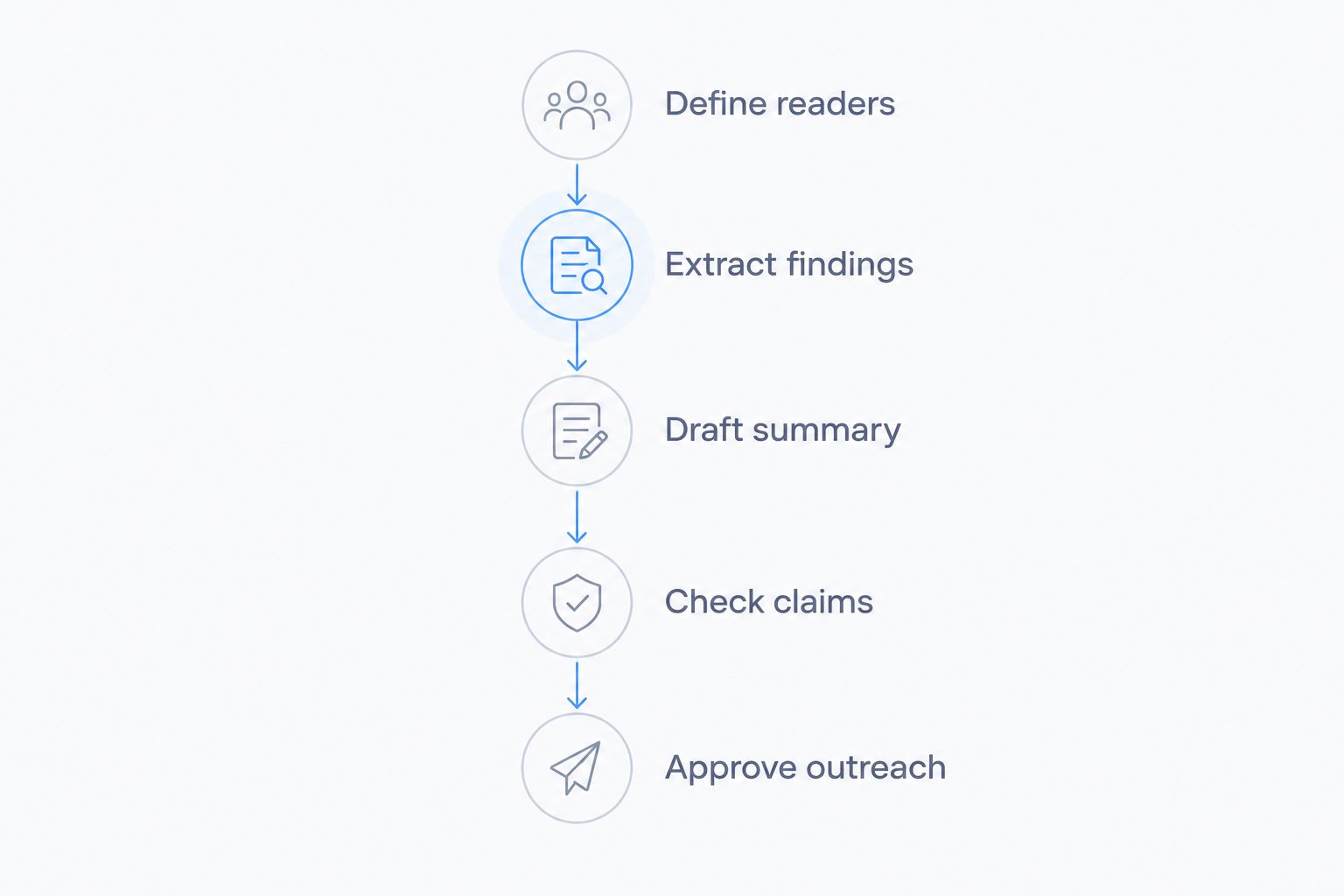
For a 2026 summary, work through these stages in order. Each stage answers a different question, so avoid treating a readability check as scientific approval.
Define readers
Name the audience and the purpose of the summary. Choose a working length, such as 150 words, as an editing constraint—not as a universal requirement. Identify the background information that reader needs.
Extract findings
Write down the question, study population or material, main finding, and limitations directly from the paper. Preserve reported quantities and units exactly when you include them. Do not ask a drafting tool to supply missing details.
Draft summary
Use ChatGPT or Claude to turn the approved source notes into connected prose. Start with 1 sentence explaining the research question, then describe the finding and its limits. This is a suggested structure, not a rule for every discipline.
Check claims
Match each factual statement to the paper. Check causal language, population boundaries, and uncertainty before you use Hemingway Editor or Grammarly to improve the wording.
Approve outreach
Resolve coauthor comments in Microsoft Word, then prepare a shorter version if your distribution channel needs one. A 50-word outreach draft is a useful exercise in prioritization, but it must retain any limitation necessary to interpret the finding.
When a summary becomes a research-promotion decision
A clear summary is material you can use in outreach; it is not an outreach strategy by itself. You still need to decide which researchers should encounter the paper and why the work is relevant to them.
Paper Spotlight research promotion is best for researchers seeking expert-led outreach for a published paper. Its service includes article analysis before promotion and targeting relevant researchers, with social media outreach as part of its offering.
Paper Spotlight’s PhD-founded perspective informs that process. Its approach includes scientific testing of outreach methods across research areas and career stages; that describes the method, not a promise of a particular citation outcome.
For your 2026 decision, separate the responsibilities clearly:
- Author responsibility: Approve the summary’s scientific claims and permissions.
- Service role: Analyze the article and plan targeted promotion.
- Potential benefit: Support visibility among readers relevant to the research.
- Limit: Promotion does not guarantee citations, publication, or peer review.
Consider Paper Spotlight when you want expert-handled promotion rather than only help rewriting sentences. Keep writing-tool selection separate from the decision to buy a promotion plan.
Explore promotion for your published paper
Review an article-analysis-led approach to reaching relevant researchers.
How these tools were ranked
This 2026 ranking prioritizes the criteria above: source fidelity, audience control, editability, readability feedback, author review, and data handling. The order follows a practical workflow from drafting to signoff; it does not represent a measured accuracy comparison.
ChatGPT is the default drafting recommendation because you can give it explicit source and audience instructions. Claude occupies the audience-adaptation slot, Hemingway Editor and Grammarly address different editing tasks, and Microsoft Word supports accountable review. None removes the need for scientific judgment.
Which plain-language summary tool should you choose?
Choose ChatGPT if you need a first draft; choose the tool that addresses your current bottleneck if you already have one. Use Claude for audience adaptation, Hemingway Editor for dense prose, Grammarly for language polishing, and Microsoft Word for coauthor approval.
In 2026, the stronger workflow is not to send a draft through every available tool. Use the fewest steps needed to produce an accurate, understandable summary, and keep an approved version separate from experimental rewrites.
FAQ
What's the best plain language summary tool for research papers?
ChatGPT is the default recommendation for a controlled first draft when you provide source text and review the result. Claude suits audience adaptation, while Hemingway Editor, Grammarly, and Microsoft Word support editing and review.
Is Claude better than ChatGPT for explaining research?
Claude is recommended here for audience-specific rewriting, while ChatGPT is the default for first drafts. This is a workflow distinction, not a measured claim that one is more scientifically accurate.
Can I use Hemingway Editor to summarize a research paper?
Use Hemingway Editor to improve the readability of an existing summary, not to verify or interpret the research. Its feedback helps you identify difficult prose that still needs an author’s judgment.
What should a plain-language research summary include?
Include the research question, the main finding, enough method or population context to interpret it, and the important limitations. Explain necessary technical terms rather than removing distinctions that affect meaning.
How do I check whether a generated summary is accurate?
Match every factual claim to the paper and check the study population, quantities, units, causal wording, and limitations. Have an author resolve substantive questions before distribution.
Can I upload an unpublished paper to a writing tool?
Check your institution’s rules, the tool’s current data-handling terms, and any confidentiality obligations before uploading an unpublished paper. Use only material you are authorized to share.
Will a plain-language summary increase my citations?
A plain-language summary does not guarantee additional citations. It gives readers an accessible explanation, but citation decisions depend on whether the work is relevant to their research.
Does Paper Spotlight replace a summary-writing tool?
No. Paper Spotlight offers article analysis and targeted research promotion rather than serving as a substitute for drafting and scientific review. Approve the summary’s claims before using it in outreach.
One last thing
Ask a reader outside your specialty to explain the finding back to you. If their explanation turns an association into a cause or a limited finding into a universal claim, revise the summary—even if every editing tool accepts the wording.