Best overall: Google Docs. Best for visual explainers: Canva. Best for sharing press files: Google Drive. The best tools to build a researcher media kit for journalists in 2026 combine a readable briefing, accessible evidence, and reusable assets—not a complicated software stack.
- Google Docs leads the best tools to build a researcher media kit for journalists: start with a clear, editable briefing.
- Canva supports visual explainers; Google Drive organizes downloadable press assets. Neither replaces scientific review.
- ORCID establishes researcher identity; Zotero organizes references; WordPress supports a public research newsroom.
- Paperspotlight supports published-paper promotion, not media-kit design or guaranteed journalist coverage.
Why this matters
A journalist needs to understand your finding, check its evidence, and reach someone who can explain it. A polished document that hides the study's limitations fails that job. Your media kit should make verification easier, not make the research sound more certain.
For early-career researchers, the kit also separates two tasks: preparing accurate materials and distributing them to relevant readers. Paperspotlight offers academic paper promotion through article analysis, targeted research promotion, and social media outreach. That is a separate service decision from choosing your document or design tool.
In 2026, build the briefing first and choose distribution tools second. Journalists need usable information; researchers considering a promotion plan need clarity about the audience and the work included.
What makes the best researcher media-kit tools
Evaluate each tool against the job it must perform:
- Scientific accuracy: You can state the finding, scope, uncertainty, and limitations without squeezing them into a misleading headline.
- Editorial control: You can revise wording and request coauthor or institutional review before distribution.
- Access: A journalist can open the briefing and retrieve files without requesting access to each asset.
- Reusable formats: You can provide readable text and separately downloadable images rather than one flattened document.
- Source traceability: The kit connects claims to the published paper, its citation, and supporting material.
- Maintenance: You can identify the current version and update contacts or corrections without leaving conflicting copies.
Do not choose every tool below. Choose the smallest combination that supports your paper, your reviewers, and your intended audience.
Researcher media-kit tools at a glance
| Rank and tool | Best for | Standout capability | Key limitation |
|---|---|---|---|
| 1. Google Docs | Writing and reviewing the core briefing | Collaborative document editing and comments | Does not validate scientific claims |
| 2. Canva | Building visual explainers | Visual layout and image export | Templates can oversimplify evidence |
| 3. Google Drive | Delivering downloadable assets | Folder-based file organization and sharing | Incorrect permissions obstruct access |
| 4. ORCID | Establishing researcher identity | Persistent researcher identifier and record | Not a media-kit publishing platform |
| 5. Zotero | Managing source references | Reference organization and bibliography creation | Not a journalist-facing briefing tool |
| 6. WordPress | Maintaining a public research newsroom | Public pages and publishing controls | Requires ongoing site maintenance |
1. Google Docs: best media-kit tool for the core briefing
Google Docs is the strongest default for drafting the material a journalist will actually read. You can write a plain-language summary, gather comments, and revise the same document before exporting or sharing it. Start here rather than designing a cover page.
Use a 1-page briefing as your editorial target, not a promise that every study fits that length. Put the finding first, then explain the study design, relevant limitations, and where the reader can access the paper. Keep supporting detail in separate files.
Google Docs pros:
- Collaborative editing supports coauthor review.
- Comments keep wording questions beside the relevant passage.
- Document export supports a separate downloadable copy.
- Version history helps you review changes.
Google Docs cons:
- Comments and suggested edits need cleanup before external sharing.
- Sharing settings require a deliberate access check.
- The tool cannot determine whether your interpretation is scientifically justified.
Best for: Researchers preparing a first media kit or coordinating review across coauthors.
Before release, open the journalist-facing version outside your usual signed-in session. Confirm that readers see the finished briefing, not the internal working document.
Verdict: Buy into Google Docs as your default drafting workflow; skip elaborate design until the wording is approved.
2. Canva: best media-kit tool for visual explainers
Canva helps you arrange a finding, diagram, or approved figure into a readable visual. Its design and export functions suit an explanatory graphic that accompanies the briefing. They do not replace the original figure or its scientific context.
Choose a visual only when it explains something the prose cannot explain as clearly. A simplified study flow can help a reader understand the method; a decorative statistic without its denominator can mislead.
Canva pros:
- Layout tools support a clear visual hierarchy.
- Templates provide a starting structure for an explainer.
- Image exports let you supply graphics separately from the briefing.
Canva cons:
- Template space can pressure you to remove necessary qualifications.
- Attractive graphics still need scientific review.
- Third-party assets require attention to usage rights.
Best for: Researchers whose method or finding benefits from a visual explanation.
Provide a caption that states what the graphic shows and what it does not establish. Identify the source of the underlying material and confirm permission before redistributing publisher-owned figures.
Verdict: Buy into Canva for a specific explanatory graphic; skip decorative visuals that add no meaning.
3. Google Drive: best media-kit tool for press-file delivery
Google Drive organizes the files that sit behind your briefing. A shared folder can contain the approved summary, a researcher headshot, image files, captions, and permitted supporting materials. The folder is a delivery system, not the explanation itself.
Separate public press assets from internal drafts. A journalist should not have to guess which image is approved, whether a file is current, or whom to ask about reuse.
Google Drive pros:
- Folders group related assets in one location.
- File sharing supports direct access to individual materials.
- Separate files preserve the distinction between briefing text and downloadable images.
Google Drive cons:
- Restricted permissions can block the intended reader.
- A cluttered folder hides the important material.
- Shared access does not establish redistribution rights.
Best for: Researchers sending several approved assets with a published-paper briefing.
For your 2026 kit, include a short file index explaining each asset's purpose and permissions. Label the approved version clearly, and remove obsolete drafts from the journalist-facing folder rather than relying on filenames alone.
Verdict: Buy into Google Drive for organized asset delivery; skip sharing your working research folder.
4. ORCID: best supporting tool for researcher identity
ORCID provides a persistent researcher identifier and a record that can include research activities and works. It helps distinguish you from researchers with similar names and connects your identity to your scholarship. It supports the kit; it does not host the whole press package.
Include your ORCID identifier alongside a short biography and current institutional affiliation. Check the record before distribution so your media kit and public identity do not point in different directions.
ORCID pros:
- A persistent identifier distinguishes researchers beyond name matching.
- The record can connect your identity with published works.
- Visibility controls let you manage which record information is public.
ORCID cons:
- An incomplete record provides limited context.
- A researcher record is not an independent assessment of a study's quality.
- ORCID does not replace a biography, interview contact, or press briefing.
Best for: Early-career researchers establishing a consistent scholarly identity.
Prepare a 2-sentence biography explaining your current role and relevant research focus. Avoid treating the identifier as a credential that proves the paper's claims.
Verdict: Buy into ORCID as an identity layer; skip using the record as your entire media kit.
5. Zotero: best supporting tool for source references
Zotero organizes references and helps generate bibliographies. Use it behind the scenes to keep the promoted paper, related studies, and background sources in order. Export the relevant citation information into a journalist-readable format.
The reference list should distinguish your paper from supporting research. A journalist needs to know which source supports the main finding and which sources provide context or competing interpretations.
Zotero pros:
- Reference collections organize material by topic or project.
- Bibliography generation reduces repetitive citation formatting.
- Stored reference information supports source checking during drafting.
Zotero cons:
- Imported metadata still needs verification.
- A bibliography does not explain why a source matters.
- Reference management does not resolve publisher access restrictions.
Best for: Researchers whose briefing depends on several background or supporting sources.
Add a brief annotation where context matters: explain whether the source is the primary paper, background evidence, or a contrasting result. Check titles, author names, publication details, and identifiers against the source before release.
Verdict: Buy into Zotero for source organization; skip sending an unexplained reference dump to journalists.
6. WordPress: best media-kit tool for a public research newsroom
WordPress supports public pages where you can maintain a biography, paper briefings, approved images, and contact information. It fits researchers who want an ongoing destination rather than a folder created for one paper. Public publishing also creates a maintenance obligation.
Keep the newsroom organized around the reader's tasks: understand the research, inspect the source, download an asset, and request an interview. Avoid burying the briefing beneath unrelated posts.
WordPress pros:
- Public pages provide a consistent destination for press materials.
- Publishing controls support revisions and additional briefings.
- Separate pages let you organize papers and researcher information.
WordPress cons:
- Site maintenance adds work beyond preparing the kit.
- Outdated pages can conflict with current information.
- Hosting and configuration decisions add complexity.
Best for: Researchers maintaining press materials across multiple published papers.
Use WordPress only when someone will own updates. A public page with an obsolete affiliation or broken contact route weakens an otherwise accurate briefing.
Verdict: Hold WordPress until you need a maintained public newsroom; skip it for a single document-only project.
Assemble the kit before choosing outreach
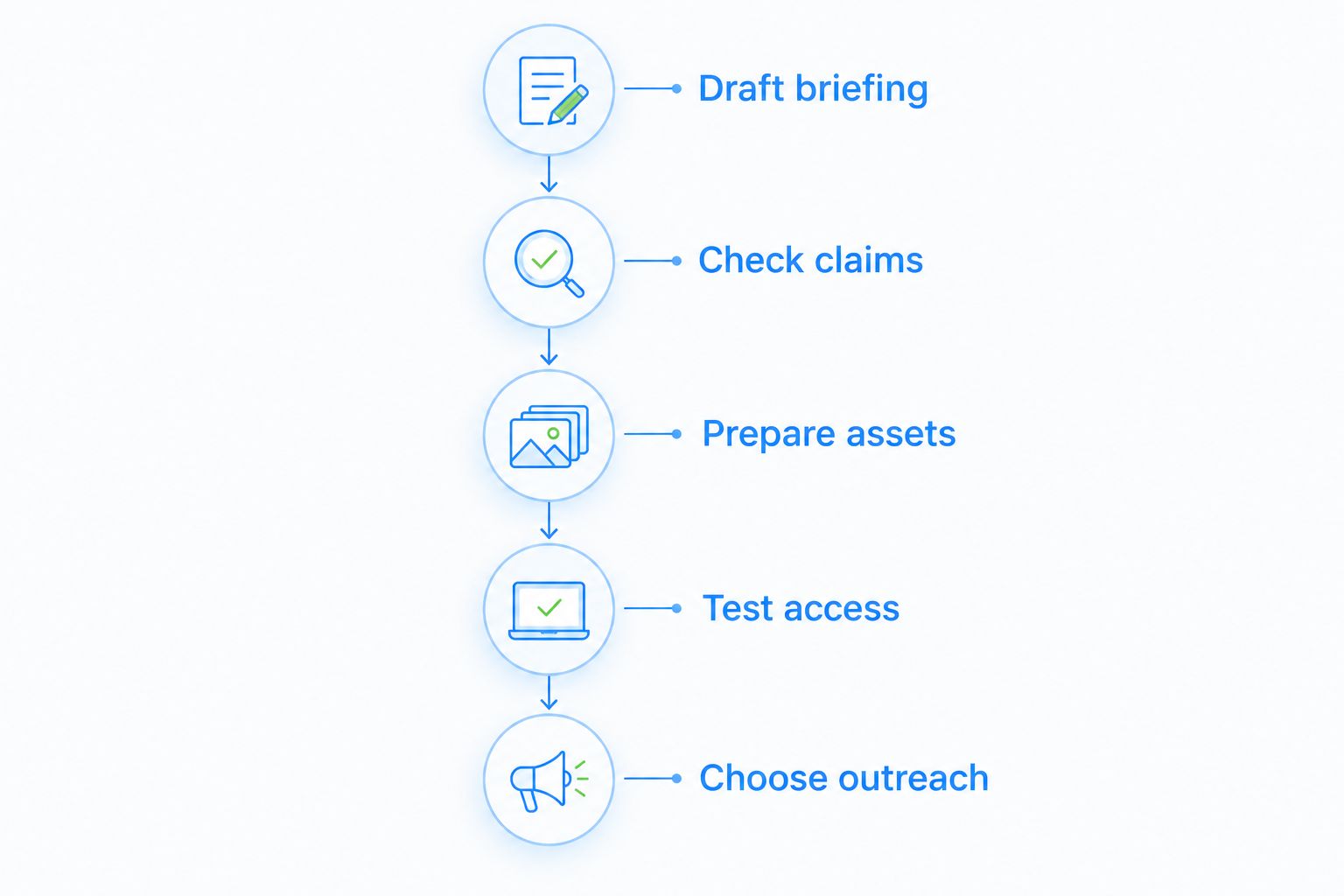
A usable kit follows a simple preparation sequence. In 2026, keep that sequence focused on accuracy and access rather than adding software for its own sake.
- Draft briefing: State the finding, study design, audience relevance, and limits.
- Check claims: Ask the appropriate coauthors or institutional reviewers to check the wording.
- Prepare assets: Add approved visuals, captions, identity information, and source references.
- Test access: Open the materials as an outside reader and confirm permissions.
- Choose outreach: Decide whether journalists, relevant researchers, or both are your intended audience.
Use a 3-item pre-send check: confirm the main claim, the paper-access route, and the interview contact. Those checks concern readiness, not evidence that the outreach will produce coverage or citations.
Paperspotlight's PhD-founded perspective connects article analysis with promotion planning. The service uses expert-led targeting of relevant researchers and scientific testing of outreach approaches across research areas and career stages. That describes the method, not a guaranteed outcome or a journalist-placement service.
Paperspotlight is best for researchers seeking expert-handled promotion of a published paper, not a media-kit builder. Before choosing a plan, clarify how the promotion audience relates to your goal and keep journalist outreach distinct from researcher outreach.
Review your paper promotion options
Consider article analysis and targeted researcher outreach alongside your finished media kit.
How the tools are ranked
This 2026 ranking prioritizes the core briefing, then visual explanation and file delivery. Identity, references, and public publishing follow because they support narrower jobs. The comparison uses established tool functions and the criteria above—not measured citation gains, journalist response rates, or a claim of hands-on testing.
Which researcher media-kit tools should you choose?
Choose Google Docs and Google Drive as the default combination. Add Canva when a visual improves understanding, ORCID for a consistent identity, and Zotero when references need organizing. Choose WordPress only when you can maintain a public newsroom.
For a first kit in 2026, finished and accessible beats elaborate and unfinished. Define the audience before considering promotion: reaching relevant researchers and helping a journalist report accurately are related goals, but they require different messages.
FAQ
What's the best tool to build a researcher media kit for journalists?
Google Docs is the best default for drafting and reviewing the core briefing. Pair it with Google Drive for approved downloadable assets, and add other tools only for a specific task.
Is Canva better than Google Docs for a research media kit?
Canva is better for visual layout; Google Docs is better for drafting and reviewing the briefing text. Approve the scientific wording before turning it into a graphic.
What should I include in a researcher media kit?
Include a plain-language briefing, the published paper's citation and access route, study limitations, a short biography, and an interview contact. Add approved images with captions and clear reuse permissions when they help explain the research.
Do I need a website before contacting journalists?
No, a readable briefing and accessible asset folder can support journalist outreach without a separate website. WordPress becomes useful when you need a maintained public destination for several papers.
Can I put my published paper PDF in the media kit?
Include the PDF only when you have permission to redistribute that version. Otherwise, provide the publication identifier or an authorized access route and clearly identify the version you are sharing.
Will a media kit increase my citations?
A media kit does not guarantee citations. It helps readers understand and verify the research, while citation decisions depend on whether other researchers find the work relevant to their scholarship.
Can Paperspotlight build my journalist media kit?
Paperspotlight's stated service is published-paper promotion through article analysis, targeted research promotion, and social media outreach. Do not assume media-kit production or journalist placement is included; clarify the scope before selecting a plan.
One last thing
Write the limitations paragraph before the headline. If the headline cannot survive the limitations, revise the headline—not the science. That is a useful final check before a journalist, coauthor, or promotion specialist sees the kit.