Best overall for distributing research podcast posts: Buffer. Best for targeted paper outreach: Paper Spotlight. Best for hands-on audio preparation: Audacity. The best podcast promotion tools for scientific research in 2026 serve different jobs: preparing an accurate episode, distributing it, and connecting listeners with the published paper.
- Buffer leads the best podcast promotion tools for scientific research shortlist for scheduling episode-related social posts.
- Paper Spotlight is best for researchers seeking expert-led promotion of a published paper alongside podcast outreach.
- Audacity and Descript prepare audio; Canva prepares visuals; Spotify for Creators supports podcast publishing.
- Choose tools by the next task, not by promises of downloads or citations.
Why this matters
A research podcast episode needs more than a publishing destination. You need an accurate explanation, a route to relevant listeners, and a clear connection to the paper that supports the discussion. Those are separate tasks.
For an early-career researcher, the goal is credible visibility rather than attention detached from the evidence. A listener should understand what your study examined, where its limitations sit, and how to find the publication. Downloads alone cannot establish that another researcher read or cited your work.
This 2026 shortlist separates podcast production tools from distribution tools and research promotion services. Choose the tool that solves your next communication problem, not the one with the longest feature list.
What makes the best research podcast promotion tools?
Evaluate each option against these criteria before choosing:
- Audience relevance: Does the option help you address researchers who study the problem, use the method, or apply the findings?
- Scientific accuracy: Can you review wording, audio, captions, and visuals before publication?
- Paper connection: Can your promotion clearly identify the published paper rather than treating the episode as the final destination?
- Distribution fit: Does the tool handle the channel you intend to use, or does it serve a different stage?
- Workflow ownership: Will you handle editing and outreach yourself, or do you need expert-led research promotion?
- Measurement discipline: Can you distinguish publishing activity and audience attention from subsequent scholarly citations?
A sensible starting brief contains a 2-sentence summary, a proposed 60-second excerpt, and 3 audience groups defined by topic, method, or application. These are preparation recommendations, not performance benchmarks. The brief gives you something concrete to evaluate before expanding the campaign.
Research podcast promotion tools at a glance
The order below starts with the paper-centered service, then separates distribution, presentation, editing, and publishing. It is a decision guide, not a claim that every researcher needs every option.
| Option | Best for | Standout function | Key limitation |
|---|---|---|---|
| Paper Spotlight | Expert-led outreach for a published paper | Article analysis and targeted research promotion | Research promotion does not replace podcast recording or editing |
| Buffer | Scheduling episode-related social posts | Social publishing workflow | Scheduling does not establish scientific relevance |
| Canva | Creating episode graphics | Visual design templates and editing | Graphics still need scientific and accessibility review |
| Descript | Editing spoken explanations through text | Transcript-based audio editing | Transcripts need checking against the recording |
| Audacity | Detailed audio cleanup | Hands-on audio recording and editing | Audio editing does not distribute the episode |
| Spotify for Creators | Publishing and managing a podcast | Podcast hosting and publishing workflow | Hosting does not replace targeted outreach |
1. Paper Spotlight: best for paper-centered research outreach
Paper Spotlight is best for researchers who want expert-led promotion of a published paper alongside podcast outreach. The service offers article analysis, targeted research promotion, and social media outreach; its role here is promoting the research behind the episode, not producing the podcast.
Its PhD-founded perspective puts the published article at the center of the process. Article analysis comes before promotion, followed by expert-led targeting of relevant researchers. The approach also includes scientific testing of outreach approaches across research areas and career stages; that describes the method, not a verified improvement in citations.
Paper Spotlight pros:
- Keeps the published paper, rather than the episode alone, central to promotion.
- Includes article analysis before outreach.
- Offers expert-led targeting of relevant researchers.
- Connects social outreach with a research promotion service.
Paper Spotlight cons:
- Does not substitute for the recording, editing, or hosting tools in this guide.
- Requires your podcast materials to remain consistent with the published findings.
- Provides no basis for expecting a guaranteed citation count.
Best for: Early-career researchers considering a promotion plan for a published paper that also features in a podcast discussion.
Before choosing a service, decide whether you need help producing an episode or reaching relevant researchers. These are different purchases. Verdict: Buy for expert-led paper promotion; skip as a podcast production solution.
2. Buffer: best for scheduling research podcast posts
Buffer is a social media publishing tool that supports scheduling posts. Use it to organize episode announcements, research summaries, and follow-up posts across supported accounts without manually publishing every update at the moment it is due.
For research communication, write each post around a distinct reason to listen. A methods-focused audience needs a different introduction from readers interested in the study's practical implications. Scheduling makes those messages easier to manage, but you still supply the targeting logic.
Buffer pros:
- Organizes episode-related posts in a publishing workflow.
- Supports preparing messages before publication.
- Separates drafting from the moment a post goes live.
Buffer cons:
- Does not evaluate whether a scientific claim is accurate.
- Does not replace podcast hosting or audio editing.
- Cannot make an irrelevant message useful merely by scheduling it.
Best for: Researchers with finished episode materials and an existing social publishing routine.
In 2026, use Buffer after checking the episode link, paper reference, and wording. Avoid scheduling interchangeable announcements that repeat the same claim without giving readers a new reason to engage. Verdict: Buy for an organized distribution workflow; skip until your episode assets are ready.
3. Canva: best for research podcast graphics
Canva is a visual design tool for creating graphics and other presentation materials. For a research podcast, use it to prepare an episode announcement, a speaker graphic, or a visual explanation that accompanies a short audio excerpt.
Start with the research question, not a decorative template. A useful graphic tells readers what the episode explains while keeping the study's conditions and limitations visible. A compelling image should not turn an association into a causal claim.
Canva pros:
- Provides templates and editing tools for promotional graphics.
- Helps prepare a consistent set of episode visuals.
- Supports visual explanations alongside audio-focused content.
Canva cons:
- Does not check scientific accuracy.
- Attractive layouts can still contain unreadable labels or excessive text.
- Does not replace a podcast host or research outreach strategy.
Best for: Researchers who need clear visual materials for an already recorded episode.
Check every graphic at the size your audience will actually see. Keep the episode's main question readable, and avoid using a dramatic headline that the paper cannot support. Verdict: Buy for visual preparation; skip decorative assets that obscure the research.
4. Descript: best for transcript-based podcast editing
Descript supports editing audio through a text-based workflow. It is useful when you want to revise a spoken explanation by working with the transcript rather than relying only on a waveform.
Research language requires careful review. Technical terms, author names, abbreviations, and qualified statements need checking against the original recording. An edit that removes hesitation should not also remove the uncertainty that belongs in the scientific explanation.
Descript pros:
- Makes spoken content accessible through a transcript-based editing workflow.
- Helps you locate passages that need revision.
- Supports preparing shorter extracts from a longer discussion.
Descript cons:
- Transcription errors require manual correction.
- Text-based edits still need an audio listening check.
- Editing does not identify the researchers you should contact.
Best for: Researchers who prefer reviewing spoken explanations as text.
For a 2026 episode, compare the edited transcript with the paper's wording wherever the discussion states a result or limitation. Then listen to the final audio rather than approving the transcript alone. Verdict: Buy for text-led editing; skip if your existing editor already meets that need.
5. Audacity: best for hands-on research podcast audio cleanup
Audacity is an audio recording and editing application. Use it when you need direct control over cuts, levels, and unwanted background sound before sharing a research discussion.
Its value is preparation rather than promotion. Clear audio helps listeners follow the explanation, but a polished recording still needs a distribution channel and an audience-specific message. Treat editing as a quality check, not an outreach campaign.
Audacity pros:
- Provides hands-on recording and audio editing.
- Supports cutting unnecessary sections and adjusting audio levels.
- Gives you direct control over the recording before publication.
Audacity cons:
- Requires time to learn an audio-editing workflow.
- Does not schedule promotional posts or host an outreach campaign.
- Cannot repair inaccurate scientific wording through sound cleanup.
Best for: Researchers comfortable handling audio preparation themselves.
Listen to your proposed 60-second excerpt without the surrounding episode. If the extract omits an essential condition, choose another passage rather than adding a stronger promotional caption. Verdict: Buy into the workflow for audio control; skip as a standalone promotion strategy.
6. Spotify for Creators: best for podcast publishing
Spotify for Creators provides tools for hosting, publishing, and managing a podcast. It belongs in this shortlist because promotion needs an episode destination that listeners can access and recognize.
Use the episode description to explain the discussion and identify the underlying publication. Confirm the current publishing workflow before committing your research podcast to it. Hosting and audience targeting remain separate decisions.
Spotify for Creators pros:
- Provides a podcast publishing destination and management workflow.
- Supports organizing episodes under a podcast.
- Gives promotional posts a clear listening destination.
Spotify for Creators cons:
- Publishing an episode does not establish its relevance to a research community.
- Does not replace scientific review of the discussion.
- Does not turn listening activity into evidence of citations.
Best for: Researchers creating a podcast series or managing its publishing process.
If you appeared on someone else's podcast, use the host's published episode rather than creating a competing destination without permission. Verdict: Buy into the publishing workflow for your own show; skip when the host already handles publication.
How we ranked the options
These recommendations match publicly documented core functions to research communication tasks: paper outreach, social scheduling, visual preparation, transcript editing, audio cleanup, and podcast publishing. They are not results from a comparative performance test.
The criteria favor accuracy and task fit over feature volume. No ranking here establishes that a tool increases citations, reaches a particular number of listeners, or performs better across scientific disciplines.
Which research podcast promotion tools should you choose?
Choose Buffer as the default when your episode is finished and your main problem is distributing related social posts. Choose a research promotion service when the harder problem is connecting the published paper with relevant researchers. Choose an editor only when the recording itself needs work.
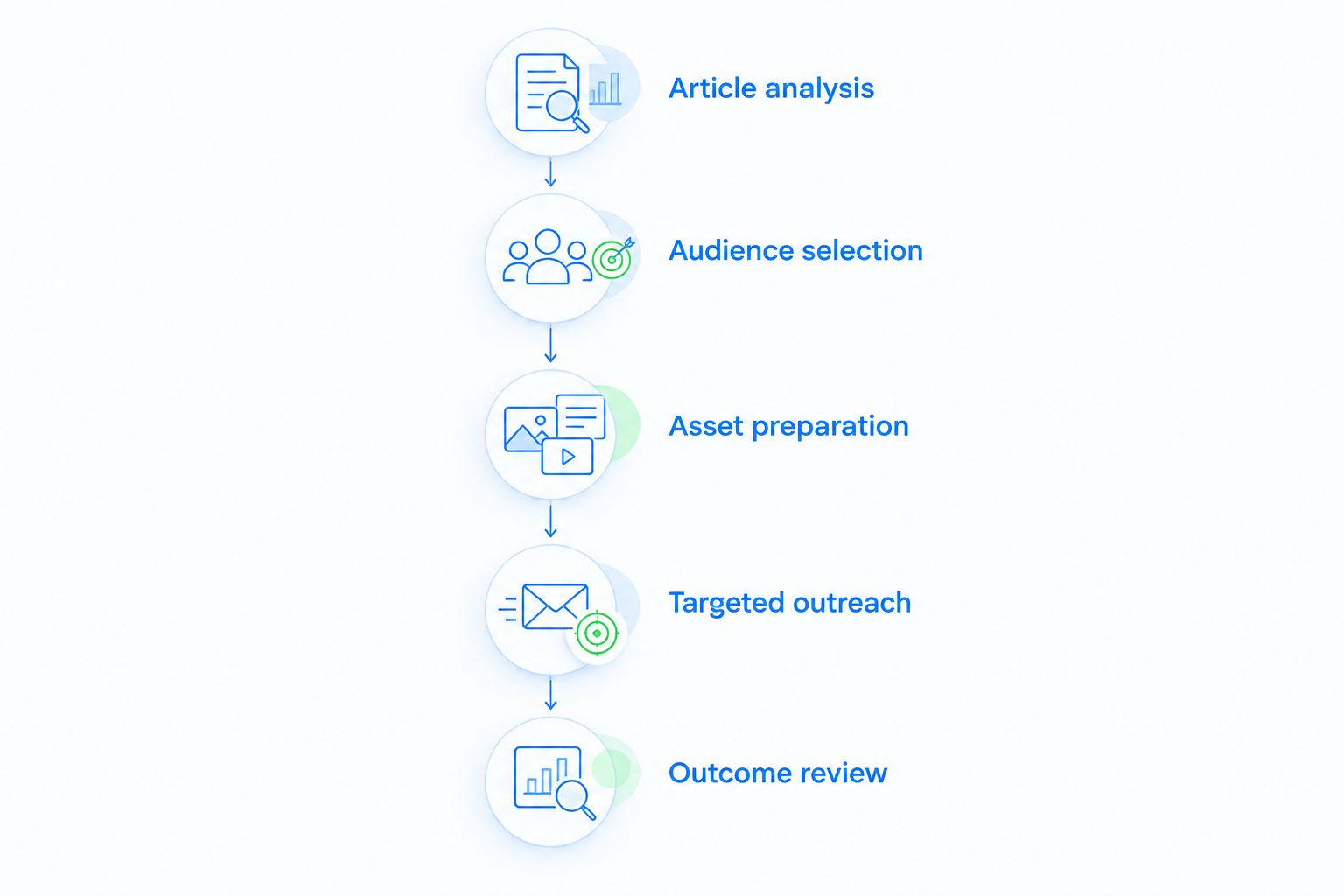
For a practical 2026 workflow, complete these stages in order:
- Article analysis: Identify the research question, findings, and limitations that the episode must preserve.
- Audience selection: Name the researchers or professional groups for whom the discussion is relevant.
- Asset preparation: Prepare the excerpt, summary, graphics, and publication reference.
- Targeted outreach: Match each message to the audience and channel.
- Outcome review: Separate publishing activity, audience response, and later citation tracking.
Keep a record of what you publish and how you describe the paper. That record helps you review whether the outreach remained accurate, even when audience activity and citation evidence arrive through different channels.
Explore promotion for your published paper
Consider article analysis and expert-led targeting alongside your podcast outreach.
FAQ
What's the best podcast promotion tool for scientific research?
Buffer is the default recommendation for scheduling social posts about a finished research podcast episode. Use separate tools for audio preparation, podcast publishing, and targeted promotion of the published paper.
Can Paper Spotlight promote the paper behind my podcast episode?
Paper Spotlight offers published-paper promotion through article analysis, targeted research promotion, and social media outreach. Treat that service as paper-centered outreach, not as podcast recording, editing, or hosting.
Is Descript better than Audacity for research podcasts?
Descript fits researchers who prefer transcript-based editing, while Audacity fits hands-on audio editing. Choose according to your editing workflow, and check the final recording for scientific accuracy either way.
Will podcast promotion increase my paper's citations?
Podcast promotion does not guarantee citations. It creates an opportunity to explain the research and direct relevant listeners to the paper; citation evidence must be assessed separately.
Do I need a podcast host if I was interviewed on another show?
You do not need a separate host merely to promote an interview already published by another show. Share the host's episode destination and confirm permission before republishing audio extracts.
What should I include in a research podcast promotion post?
Include the research question, a reason the intended audience should listen, and a clear reference to the published paper. Keep essential limitations visible rather than using a headline that overstates the result.
How should early-career researchers evaluate a paid promotion plan?
Evaluate the scope of article analysis, audience targeting, outreach responsibilities, and reporting before selecting a plan. Reject promises of guaranteed citations, publication, or peer review.
One last thing
Your strongest promotional excerpt is not necessarily the most dramatic sentence. Choose a passage that remains accurate when someone hears it without the rest of the interview. Preserving an essential qualifier gives the listener a more faithful account of your research than a sharper claim the paper cannot support.