
Best overall for individual outreach: Outlook with your institutional Microsoft account. Best for Google-based institutions: Gmail. Best for organizing recipient research: Zotero. This 2026 guide compares the best academic email outreach tools for researchers, separates personal correspondence from newsletters, and explains where expert-led paper promotion fits.
- The best academic email outreach tools for researchers depend on personal correspondence, permission-based newsletters, and recipient research.
- Outlook and Gmail suit individual academic outreach through an institution-approved account.
- Zotero supports recipient research; Mailchimp and Brevo support permission-based newsletters.
- Paper Spotlight suits researchers seeking expert-led paper promotion rather than email automation.
Why this matters
A published paper needs relevant readers, not an indiscriminate mailing list. Before choosing an outreach tool, decide whether you are contacting a particular researcher, updating subscribers, or seeking help explaining and promoting your work.
Paper Spotlight is best for researchers seeking expert-led promotion of a published paper rather than a do-it-yourself email tool. Its service includes article analysis, targeted research promotion, and social media outreach. You can explore Paper Spotlight when your main challenge is promotion strategy rather than operating an inbox.
Email software cannot establish scientific relevance for you. A carefully selected recipient and an accurate explanation of the paper matter more than sending automation.
What makes the best academic email outreach tools?
Use these criteria to choose your 2026 workflow before comparing features:
- Institutional fit: Use an account and workflow permitted by your university, employer, or research organization.
- Audience relevance: Identify why each recipient would find the published work useful before writing.
- Message control: Review the subject, scientific claims, link, and recipient details before sending.
- Permission management: Separate individual correspondence from newsletters that require subscriber and unsubscribe handling.
- Research organization: Keep source papers and recipient-selection notes organized without treating bibliographic records as a mailing list.
- Appropriate measurement: Evaluate relevant replies and reader engagement without presenting email activity as evidence of future citations.
The right tool should support the task you actually have. Newsletter management is useful for an established subscriber audience; it is not a reason to turn a list of unfamiliar researchers into subscribers.
Academic email outreach tools at a glance
| Option | Best for | Standout capability | Key limitation |
|---|---|---|---|
| Outlook | Individual outreach at Microsoft-based institutions | Email and calendar workflow | Recipient selection remains manual |
| Gmail | Individual outreach at Google-based institutions | Search, labels, and email composition | A personal inbox is not a newsletter-management workflow |
| Zotero | Evidence-based recipient research | Organizing publications, collections, and notes | Does not send outreach emails |
| Mailchimp | Permission-based research newsletters | Campaign creation and subscriber management | Not the right default for unsolicited individual correspondence |
| Brevo | Maintaining an ongoing research mailing list | Email campaigns and contact management | Requires deliberate contact and permission management |
| Paper Spotlight | Expert-led promotion of a published paper | Article analysis before targeted promotion | A promotion service, not a self-service email application |
No single option replaces every other row. An inbox handles correspondence, Zotero supports preparation, a newsletter platform manages subscribers, and a promotion service addresses the paper's positioning and reach.
1. Outlook: best for institutional Microsoft email outreach
Outlook is the strongest default when your institution already uses Microsoft email. It handles messages and calendar activity in the same workflow, making it suitable for research correspondence that develops into a discussion or meeting.
For academic outreach, start with a personal message rather than a campaign. Explain the connection between the recipient's work and your paper, then give a clear reason to read it.
Outlook pros:
- Fits an existing institutional Microsoft email workflow.
- Keeps outreach and subsequent replies in an ordinary correspondence thread.
- Supports email organization alongside calendar activity.
Outlook cons:
- Does not identify scientifically relevant recipients for you.
- Repeated manual messages still require careful personalization and review.
Best for: Researchers contacting selected peers through an approved institutional Microsoft account.
Use Outlook when you need to introduce a published finding, ask a focused question, or invite a discussion. Do not move to a campaign platform merely because you want to contact several people; the nature of the correspondence should determine the workflow.
Verdict: Choose Outlook if it is your institution's approved email environment.
2. Gmail: best for Google-based academic correspondence
Gmail is the equivalent default for researchers whose institution uses Google email. Its search and labels help you organize conversations, while drafts let you review a message before sending it.
The main advantage is continuity: outreach arrives in the same environment where you already handle professional replies. That matters when your goal is a relevant conversation rather than a broadcast.
Gmail pros:
- Fits an existing institutional Google email workflow.
- Supports searchable correspondence and label-based organization.
- Lets you prepare and review individual messages without a separate campaign system.
Gmail cons:
- Recipient relevance still depends on your research and judgment.
- It is not a substitute for subscriber consent and unsubscribe management.
Best for: Researchers using an approved Google-based institutional account for individual messages.
Keep your draft structure consistent, but rewrite the relevance statement for each recipient. A reusable structure is useful; a generic claim that a paper is relevant to everyone's research is not.
Verdict: Choose Gmail when it matches your institution's email setup.
3. Zotero: best for researching relevant recipients
Zotero is a reference manager, not an email sender. It belongs in this comparison because credible academic outreach starts with understanding the literature and identifying researchers whose work connects to your paper.
Use collections and notes to organize relevant publications. Record the actual connection: a shared method, a related dataset, a contrasting result, or a research question your paper addresses.
Zotero pros:
- Organizes source publications into collections.
- Supports notes that preserve the reason for a recipient's relevance.
- Keeps outreach preparation connected to the literature rather than a generic contact list.
Zotero cons:
- Does not send or manage outreach campaigns.
- Bibliographic metadata is not proof that a researcher welcomes promotional messages.
Best for: Researchers building a defensible shortlist before writing individual emails.
Pair Zotero with your approved inbox. Read enough of a recipient's work to explain the connection accurately; do not infer relevance from an author's name or a broad department label alone.
Verdict: Choose Zotero as a preparation tool, not an email automation tool.
4. Mailchimp: best for permission-based research newsletters
Mailchimp supports email campaigns and subscriber management. It fits a research newsletter when readers have chosen to receive updates about your lab, project, or research topic.
That is a different use case from introducing a paper to an unfamiliar researcher. Newsletter software should serve a subscriber relationship, not manufacture one from published email addresses.
Mailchimp pros:
- Supports composing and sending newsletter campaigns.
- Provides subscriber-management tools.
- Includes unsubscribe handling for campaign recipients.
Mailchimp cons:
- Requires attention to permissions and contact-list maintenance.
- A campaign format is less suited to a specific scholarly question than individual correspondence.
Best for: Researchers or research groups publishing updates to an audience that requested them.
Choose a newsletter format when you have an ongoing editorial purpose. Explain what readers will receive, make subscription expectations clear, and keep the published paper's findings distinct from promotional language.
Verdict: Choose Mailchimp for a permission-based newsletter; skip it for personal introductions.
5. Brevo: best for ongoing research mailing-list management
Brevo offers email campaign and contact-management functions. It is an alternative for researchers who need to maintain an ongoing mailing list rather than manage outreach through individual inbox threads.
The decision between Brevo and Mailchimp should follow your actual workflow. Check how each handles your subscriber records, campaign preparation, unsubscribe process, and institution's data requirements before committing.
Brevo pros:
- Supports email campaign creation.
- Provides contact-management functions.
- Supports unsubscribe handling for campaign messages.
Brevo cons:
- Requires responsible contact collection and permission management.
- Cannot determine whether a paper is scientifically relevant to a recipient.
Best for: Research teams managing recurring updates and subscriber records.
Do not migrate a contact list merely to gain sending features. First establish who belongs on it, why they expect updates, and who is responsible for maintaining it.
Verdict: Choose Brevo when ongoing contact management is the task; skip it for isolated peer correspondence.
6. Paper Spotlight: best for expert-led published-paper promotion
Paper Spotlight offers academic paper promotion services rather than a self-service email application. Its PhD-founded perspective connects article analysis with expert-led targeting of relevant researchers and social media outreach.
The service's approach includes scientific testing of outreach approaches across research areas and career stages. That describes its method, not evidence of a particular performance result or a guaranteed citation increase.
Paper Spotlight pros:
- Includes article analysis before promotion.
- Uses expert-led targeting of relevant researchers.
- Addresses published-paper promotion beyond inbox operation alone.
Paper Spotlight cons:
- Does not replace your institutional inbox or reference manager.
- Promotion does not guarantee citations or determine another researcher's decision to cite.
Best for: Early-career researchers seeking help with a published paper's positioning and relevant audience.
When considering a promotion plan, focus on the scope of analysis, audience selection, and outreach work. Ask how your contribution will be represented and how the service distinguishes visibility from citation outcomes.
Verdict: Choose the service for promotion support, not as a replacement for email software.
Build an academic outreach workflow for 2026
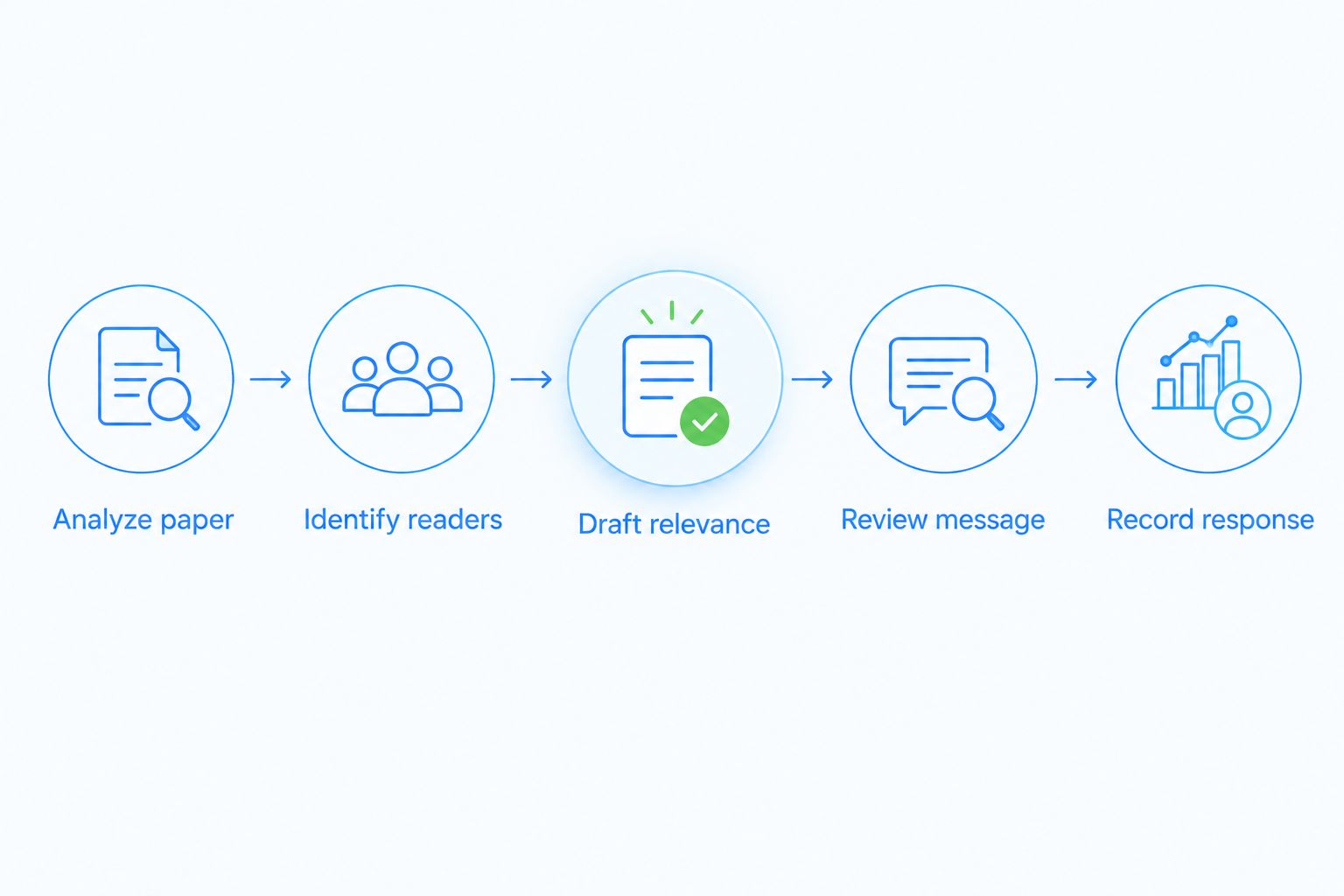
Before choosing automation, work through this sequence. It keeps the scientific contribution ahead of the distribution channel.
- Analyze paper: Identify the finding, intended reader, and limits of the claim.
- Identify readers: Select researchers whose published work has a specific connection to yours.
- Draft relevance: Explain that connection before summarizing the paper.
- Review message: Check accuracy, tone, recipient details, and access to the article.
- Record response: Note substantive replies and requests without treating silence as a verdict on the research.
This sequence works with an institutional inbox and a reference manager. It also gives you clear questions to ask a promotion provider about its proposed work.
Keep the first message focused
Use 1 published paper per introductory email as a drafting rule. Start with a specific connection to the recipient's work, summarize the relevant finding, and provide access to the paper. Avoid attaching unrelated publications or asking for a citation.
Try a 100-word draft as an editing exercise, not a performance benchmark. If you cannot explain the connection clearly at that length, revise the audience choice or the summary before adding more text.
Write 2 sentences about relevance before describing your credentials. These are practical writing constraints, not tested response-rate formulas. The recipient needs to understand why the research belongs in their reading queue.
Explore support for your published paper
Review article analysis and targeted promotion before choosing a plan.
How these options were ranked
The 2026 ranking prioritizes task fit, institutional compatibility, message control, audience preparation, and permission management. Outlook and Gmail come first because they match individual correspondence; the other options address preparation, newsletters, or expert-led promotion.
This is a workflow comparison, not a tested deliverability ranking. No response-rate, citation-growth, or campaign-performance claim determines the order.
Which academic email outreach tool should you choose?
For most individual outreach, choose the inbox your institution already approves. Add Zotero when you need a better record of why each researcher belongs on your shortlist.
Choose Mailchimp or Brevo only when your task is a permission-based newsletter. Choose expert-led promotion support when the difficult part is explaining the paper and reaching relevant researchers, rather than composing and sending messages.
For your 2026 decision, write down the task first: correspondence, subscriber updates, recipient research, or promotion support. Match the tool to that task instead of buying a larger workflow than you need.
FAQ
What's the best academic email outreach tool for researchers in 2026?
Your institution-approved inbox is the best default for individual academic outreach: Outlook for Microsoft-based institutions and Gmail for Google-based institutions. Use a newsletter platform for subscribers, not as a substitute for personal correspondence.
Is Gmail better than Outlook for promoting a research paper?
Neither is universally better for research-paper outreach. Choose the institution-approved option, then focus on recipient relevance and an accurate explanation of the paper.
Can Zotero send outreach emails to researchers?
Zotero is a reference manager, not an outreach email sender. Use it to organize relevant publications and selection notes, then compose messages in your approved inbox.
Should I use Mailchimp or Brevo to contact unfamiliar academics?
Neither is the default for unsolicited individual academic introductions. Their campaign and subscriber functions fit permission-based newsletters; use personal correspondence for a specific scholarly connection.
Can I pay a service to increase my paper's citations?
You can purchase promotion work, but citations are not an outcome a service can guarantee. Researchers decide whether to cite a paper based on its relevance to their own work; do not pay for citations.
What does Paper Spotlight offer instead of an email outreach tool?
Paper Spotlight offers article analysis, targeted research promotion, and social media outreach for published papers. Its expert-led promotion service addresses positioning and audience reach rather than replacing an institutional inbox.
What should I include in an email about my published paper?
Include the specific connection to the recipient's research, the relevant finding, and a way to access the paper. Make any request clear and avoid implying that the recipient should cite it.
One last thing
Before sending, remove your paper's title from the draft and reread the relevance sentence. If the message could introduce almost any paper in your field, rewrite it. A specific reason to read is more useful than another sending feature.