
Best overall: the ORCID record editor. Best for journal-article imports: Crossref Metadata Search. Best for datasets and other DOI-linked outputs: DataCite Search. Best for connecting a Scopus publication record: the Scopus author-profile connection. The best ORCID profile optimization tools in 2026 improve attribution and record accuracy; they do not turn an identifier into a research promotion campaign.
- The best ORCID profile optimization tools start with the ORCID record editor for accurate attribution and visibility settings.
- Crossref Metadata Search helps connect journal articles to your ORCID record through DOI-based matching.
- DataCite Search supports discovery and linking of datasets and other registered research outputs.
- Paper Spotlight is best for targeted research promotion after you have corrected your publication record.
Why this matters
Your ORCID record helps readers and research systems connect your identity with your work. A missing paper, incorrect affiliation, or hidden entry weakens that connection. Correct attribution comes before broader exposure.
Profile maintenance and paper promotion solve different problems. ORCID organizes your research identity; Paper Spotlight offers article analysis, targeted research promotion, and social media outreach for published papers. Choose the former to correct your record and the latter when you need help reaching relevant readers.
For your 2026 profile review, start with the paper you want people to discover. Confirm that its title, identifier, authorship, and visibility are correct before choosing another tool.
What makes the best ORCID profile optimization tools
Evaluate each option against the job you actually need done, not the number of features on a product page.
- Identity accuracy: You can confirm that a publication belongs to you rather than a researcher with a similar name.
- Identifier quality: The workflow preserves the correct DOI or other identifier instead of relying only on title matching.
- Source transparency: You can distinguish information you entered from information added by an authorized organization.
- Coverage fit: The source includes your output type, whether that is a journal article, dataset, or another research contribution.
- Record control: You can review imported information, address duplicate entries, and choose visibility settings.
- Maintenance burden: The workflow reduces repeated entry without replacing your responsibility to check the result.
These criteria favor a small, accurate toolset. Adding every available connection creates more review work without necessarily improving your record.
ORCID optimization tools at a glance
| Tool or connection | Best for | Standout capability | Key limitation |
|---|---|---|---|
| ORCID record editor | Direct control of your research identity | Editing record information and visibility | Manual entry requires careful checking |
| Crossref Metadata Search | Finding journal articles by DOI and metadata | Searching Crossref-registered works and connecting selected works | Coverage depends on deposited metadata |
| DataCite Search | Finding datasets and other research outputs | Searching DataCite DOI metadata and linking relevant works | Not every output has a DataCite DOI |
| Scopus author-profile connection | Connecting publications associated with your Scopus profile | Associating an indexed author record with ORCID | Author matches and indexed coverage require review |
The ORCID record editor is the default choice. Use the other options as sources of relevant records, not as substitutes for checking your own identity.
1. ORCID record editor: best for direct profile control
The ORCID record editor lets you maintain your biography, affiliations, works, and other supported record information. It is the right starting point because it is where you review the result of imports and manage visibility. ORCID uses a 16-digit identifier to distinguish your research identity from someone else's name.
Start with the information a reader needs to recognize you. Use a consistent professional name, add relevant name variants, and check that your current affiliation is accurate. Keep the biography factual and focused on your research rather than filling it with promotional claims.
ORCID record editor pros:
- Direct control over information you enter yourself.
- Visibility settings for individual record items.
- A central place to inspect imported works and their sources.
- Manual entry when a suitable import route is unavailable.
ORCID record editor cons:
- Manual transcription can introduce title or identifier errors.
- A complete record does not distribute your paper to prospective readers.
- Imported entries still need review for relevance and duplication.
Best for: Researchers establishing a reliable identity record or correcting an existing one.
Verdict: Use. Make the ORCID record editor your control point before connecting external sources.
2. Crossref Metadata Search: best for journal-article imports
Crossref Metadata Search helps you find works in Crossref's deposited metadata. Through the ORCID Search & Link workflow, you can identify relevant publications and connect selected works to your record. This is particularly useful when your published article has a Crossref-registered DOI.
Search with the article title or DOI rather than your surname alone. Before selecting a result, compare the title, author list, publication venue, and identifier with the publisher's version. A matching name is not enough to establish authorship.
Crossref Metadata Search pros:
- DOI-based matching gives you a precise identifier to check.
- Deposited metadata reduces the need to type every field manually.
- Article-level searches help separate your work from namesake results.
Crossref Metadata Search cons:
- Search quality depends on the metadata deposited for the work.
- Missing or incorrect author information can complicate matching.
- Crossref coverage is not a complete inventory of every research output.
Best for: Researchers adding journal articles and other works registered with Crossref.
Verdict: Use. Choose Crossref Metadata Search when the DOI and publication metadata match your paper; skip unrelated results regardless of the name match.
3. DataCite Search: best for datasets and other research outputs
DataCite Search helps you discover research outputs with DataCite-registered DOIs. Its ORCID connection provides a route for linking relevant works, including datasets and other outputs beyond conventional journal articles. Use it when an article-only workflow leaves important contributions out of your record.
Check what the DOI identifies before adding the result. A dataset, a software release, and a journal article describing that work are separate outputs; they should not be treated as interchangeable publications. Also inspect version information when the repository provides it.
DataCite Search pros:
- Supports discovery of research outputs beyond journal articles.
- DOI metadata helps identify the specific contribution.
- Gives you another import route when Crossref is not the relevant source.
DataCite Search cons:
- Outputs without DataCite-registered DOIs will not be found through this source.
- Repository metadata still needs an authorship and version check.
- Related outputs can be confused if you select results by title alone.
Best for: Researchers whose contributions include datasets or other DataCite-registered outputs.
Verdict: Use. Choose DataCite Search for the output it actually describes, not simply because its title resembles your paper.
4. Scopus author-profile connection: best for indexed publications
Scopus author profiles group publications associated with an indexed author identity. Connecting the appropriate author profile with ORCID helps associate that publication record with your persistent identifier. This is useful when your publications are already represented in Scopus.
Review the author profile before connecting it. Check that its listed publications belong to you, and use the available correction process for mismatched or split author records. Moving an incorrect match into another system does not fix the underlying attribution problem.
Scopus author-profile connection pros:
- Starts from an existing collection of indexed publications.
- Connects a database-specific author identity with your ORCID identifier.
- Provides an opportunity to inspect attribution problems in the source profile.
Scopus author-profile connection cons:
- Scopus coverage does not include every publication or research output.
- Automated author grouping requires your review.
- A connection does not remove the need to inspect your ORCID works list.
Best for: Researchers with an identifiable Scopus author profile containing relevant publications.
Verdict: Use after review. Hold the connection if the source profile mixes your publications with someone else's.
How we ranked these options
This 2026 ranking prioritizes direct record control, identifier accuracy, output coverage, and reviewability. The ORCID record editor comes first because every researcher needs a place to inspect and correct the final record. Crossref, DataCite, and Scopus fill distinct source-specific roles.
The ranking is a workflow recommendation, not a performance test. It does not compare citation gains or claim that one connection improves search rankings. The best source is the one that accurately represents your actual contribution.
Build a reliable ORCID record before promoting it
Use this sequence for your 2026 update. Complete the checks on your priority paper first, then apply the same process to the rest of your record.
Verify identity
Confirm your professional name, relevant name variants, and affiliation. Check that the ORCID identifier you use in manuscript submissions and institutional systems is your own. Do not create another record to solve a forgotten-login problem; use the account recovery process.
Import works
Choose the source that matches the output: Crossref for an appropriate registered article, DataCite for an appropriate registered research output, or a reviewed Scopus author connection. Use manual entry when the relevant source does not contain the work.
Review duplicates
Compare records that appear to describe the same publication. ORCID can group works using shared identifiers, so inspect the DOI and source information before removing an entry. Two similar titles can also represent different versions or distinct outputs.
Set visibility
Check the visibility of the information you want readers to find. An accurate entry that is restricted is not serving the same public-discovery purpose as a public entry. Keep sensitive information restricted rather than making every field public by default.
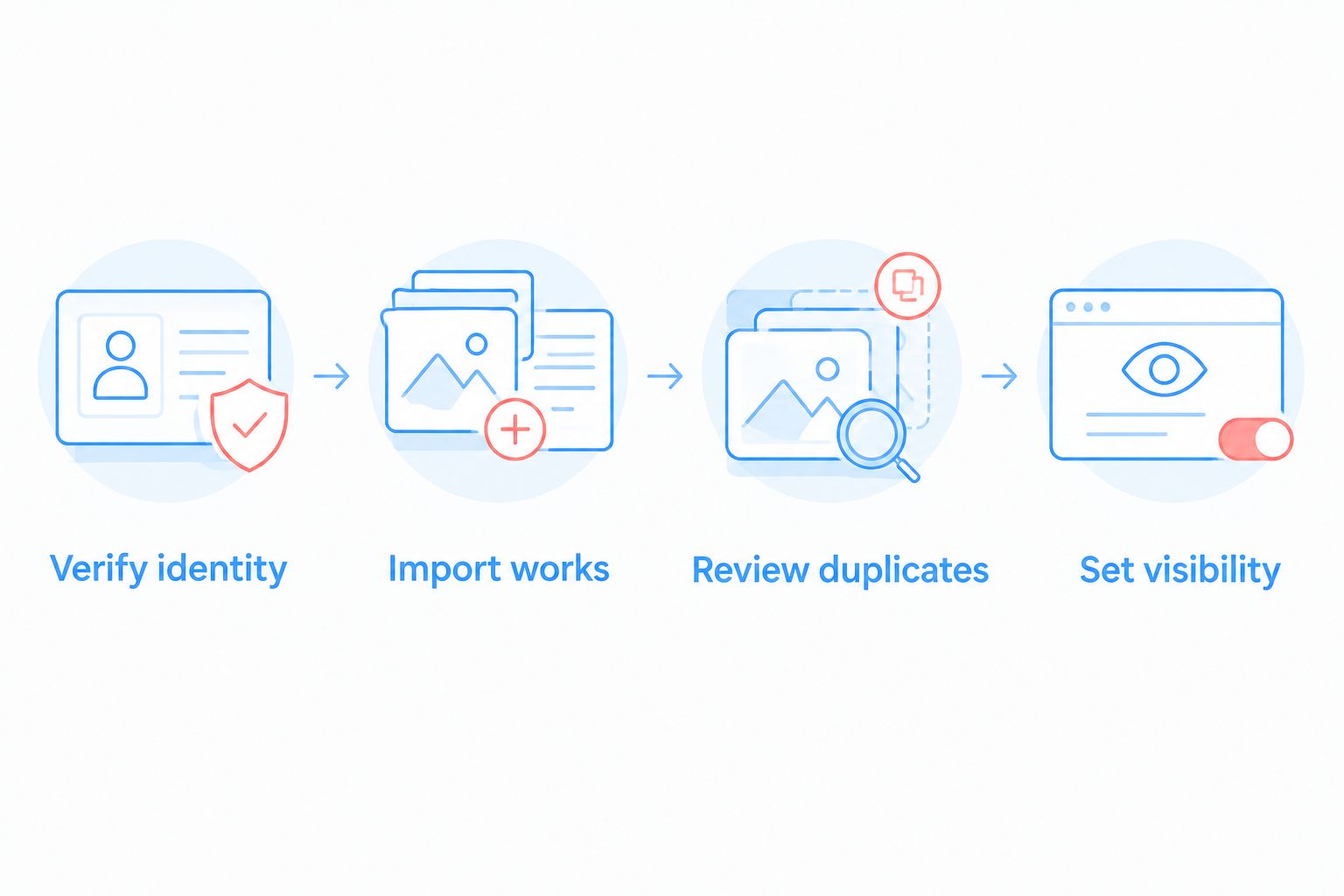
Before sharing your profile, perform 3 checks on the priority paper: confirm authorship, confirm the DOI, and confirm public visibility. These checks are an editorial routine, not an ORCID completeness score.
When profile optimization is not enough
An accurate ORCID record helps people identify your work. It does not explain why a particular researcher should read your paper or place that explanation in front of the right audience. That is the separate task of research promotion.
Paper Spotlight's PhD-founded perspective informs its article analysis before promotion and expert-led targeting of relevant researchers. Its approach includes scientific testing of outreach methods across research areas and career stages. Those process details do not establish a specific citation outcome or prove that a particular campaign will succeed.
Paper Spotlight is best for researchers seeking expert-handled academic paper promotion after their publication record is accurate. Its role is to help communicate and distribute published research, not to edit ORCID records or secure publication.
Service advantages:
- Article analysis informs the promotion approach.
- Targeting focuses on relevant researchers rather than visibility alone.
- Social media outreach adds a distribution activity beyond profile maintenance.
Service limitations:
- Promotion does not replace accurate metadata or accessible research.
- Reader attention does not guarantee a citation.
- A promotion service cannot substitute for publication or peer review.
Before choosing a plan in 2026, define the paper you want promoted, the audience you want to reach, and the outcome you want to observe. Ask how targeting and reporting address those objectives. Treat visibility, readership, and citations as different outcomes rather than interchangeable success measures.
Review your paper promotion options
Consider targeted outreach after checking your paper's attribution and public record.
Which ORCID optimization tool should you choose?
Start with the ORCID record editor, then add only the source connections your publications require. Crossref Metadata Search is the next choice for a matching journal article. DataCite Search is the better fit for a matching dataset or other registered output. Review your Scopus author profile before connecting it.
For an early-career researcher, the practical 2026 goal is a correct, readable public record, not the largest possible works list. Once your priority publication is attributed correctly, decide whether your next task is record maintenance or reaching relevant readers.
FAQ
What's the best ORCID profile optimization tool in 2026?
The ORCID record editor is the best starting point because it lets you review your information, works, and visibility settings. Add Crossref, DataCite, or a reviewed Scopus connection when those sources contain your research outputs.
Can I use Crossref to add papers to ORCID?
Yes, Crossref Metadata Search provides an ORCID Search & Link route for selecting relevant registered works. Check the title, authorship, publication venue, and DOI before adding a result.
Is DataCite better than Crossref for my ORCID record?
DataCite is the better choice when the output you need has a DataCite-registered DOI; Crossref is the relevant choice for a Crossref-registered work. Choose by the actual identifier source and output, not by a general preference for either service.
Will optimizing my ORCID profile increase citations?
ORCID profile optimization does not guarantee additional citations. Accurate attribution helps readers identify your work, while citations depend on whether other researchers use and reference it.
Should every item on my ORCID record be public?
No, make the research information you want readers to discover public while keeping sensitive information restricted. Check visibility item by item rather than assuming the whole record has one setting.
Can I connect Scopus to ORCID if my author profile is wrong?
Correct the Scopus author profile before relying on its connection to ORCID. Review publications attributed to you and address namesake matches or split records through the available correction process.
Does Paper Spotlight optimize ORCID profiles?
The stated Paper Spotlight offering is academic paper promotion through article analysis, targeted outreach, and social media promotion, not ORCID record editing. Use ORCID tools for attribution and consider the service separately when you want help reaching relevant readers.
One last thing
A duplicate-looking entry is not automatically an error. ORCID groups works using shared identifiers, and entries can carry different sources or represent different versions. Inspect the identifier and source before deleting anything; a tidy-looking profile is not a substitute for an accurate one.