
Instead of manually rewriting every ResearchGate update for social media, connect ResearchGate activity to social media outreach through a review queue: record a useful discussion or paper update, draft an audience-specific post, and approve it before publishing. This guide gives you a repeatable editorial workflow rather than an automatic account-to-account connection.
- Connect ResearchGate activity to social media outreach through a reviewed queue, not automatic reposting.
- Paper Spotlight suits early-career researchers seeking expert-led academic paper promotion rather than managing every outreach task themselves.
- Use ResearchGate discussions to identify reader questions; keep public posts focused on the published paper.
- Track relevant conversations and paper visits separately from citations; attention is not evidence of scholarly impact.
Why this matters
ResearchGate activity and social media outreach serve different purposes. A technical exchange helps you understand what another researcher needs; a public post needs enough context for someone who has not read that exchange.
Transfer the research question, not the entire conversation. Reposting a comment without its context risks overstating a finding or exposing someone else's words to an unintended audience.
For your 2026 outreach, treat ResearchGate as an editorial input rather than a mailing list. Paper Spotlight offers academic paper promotion through article analysis and targeted outreach; the same analysis-first principle applies when you manage the workflow yourself.
The objective is credible visibility among relevant readers. A visit, a discussion, and a citation are different outcomes, and your reporting should keep them separate.
Before you start
- Access and materials: Have access to your ResearchGate account, the social account you control, your published paper's DOI or publisher record, and a document or spreadsheet for the queue. Start with 1 paper so you can check the entire process before expanding it.
- Publication and permissions: Confirm which paper version you can share and whether any figure needs separate permission. A published article does not automatically give you unrestricted rights to redistribute its files or illustrations.
- The gotcha: A discussion is not permission to republish another person's comment. Paraphrase the underlying research question without identifying the participant, or obtain permission before quoting or attributing their words.
Use an accessible destination that you are authorized to share. If the article requires subscription access, describe that honestly and identify a lawful public version when one exists; do not suggest that every reader can download the publisher's file.
Configure your source record
Create your own worksheet for the workflow. The bold labels below are fields you create, not ResearchGate interface controls, so you can use the same structure in any document or spreadsheet.
- Create a section called Source record. Add fields named Paper, Publication link, Activity, Reader question, Evidence, Audience, and Permission check.
- Enter the article title in Paper and its DOI or publisher destination in Publication link. Confirm that the destination identifies the correct article and version.
- Record a relevant ResearchGate exchange or paper update in Activity. Summarize it in your own words rather than copying a comment thread.
- Write the underlying question in Reader question. For example, distinguish a question about the study's method from a question about whether its findings apply in another setting.
- Add the supporting passage, table, or figure reference to Evidence. Include the limitation that belongs beside the finding.
- Specify the intended readership in Audience and record any sharing restrictions in Permission check. Describe readers by research interest or methodological need, not simply as academics.
Expected result: You have a source record that connects an actual reader need to a supported claim in your paper. Another author should be able to understand the proposed outreach without reopening the original discussion.
For a 2026 campaign record, write the review date alongside the activity. This prevents an older exchange from being presented as a new development and makes later corrections easier to trace.
Do not add contact details collected from participant profiles. This workflow uses questions to improve your message; it does not turn discussion participants into an unsolicited outreach list.
Prepare your outreach drafts
A ResearchGate exchange supplies the topic, not the finished social post. Build the post around the audience's question, then explain what your paper contributes and where its evidence stops.
- Create an Outreach drafts section with Question, Finding, Boundary, Destination, and Status fields.
- Fill Question with the reader problem from your source record. Remove references that require someone to have followed the original thread.
- Fill Finding with a claim the article supports. Preserve the distinction between association and causation, and between results in the studied setting and claims about other settings.
- Fill Boundary with the relevant limitation. Keep it close to the finding instead of hiding it after the link.
- Write 2 drafts: a question-led post and a finding-led post. Both must point to the same evidence; they differ in their opening, not their scientific claim.
- Put the authorized article destination in Destination. Set Status to Needs review until the text, attribution, and sharing permissions have been checked.
Expected result: You have two usable messages that stand alone outside ResearchGate. Each explains the research, identifies its scope, and gives a reader a clear next step.
Use this question-led structure: describe the problem, state what the paper examined, explain the relevant finding, name its boundary, and invite readers to examine the article. Avoid an invented quotation or an unsupported claim that the work changes the field.
For the finding-led version, open with the contribution and immediately supply the setting. That keeps a concise post from turning a narrow result into a general promise.
Maintain your publication log
The review queue becomes useful when it preserves decisions. Keep the source record, approved draft, published destination, and response notes together rather than scattering them across accounts.
- Create a Publication log section with Approved text, Reviewer, Publish date, Post location, Response, and Next action fields.
- Copy only the reviewed version into Approved text. Record who checked scientific accuracy and permissions in Reviewer; follow your coauthors' or institution's approval requirements.
- Publish through the social account you control. Check the live post for a working article link, readable formatting, and the correct wording rather than assuming the draft transferred unchanged.
- Record the actual date and post location. Use a campaign label such as 2026 paper outreach to separate the current effort from older promotion.
- Add substantive questions to Response. In Next action, distinguish a reply, a correction, a new explanation, and no further action.
Expected result: Every published post has an identifiable source, approved wording, and follow-up decision. You can explain why the post exists and what happened after publication.
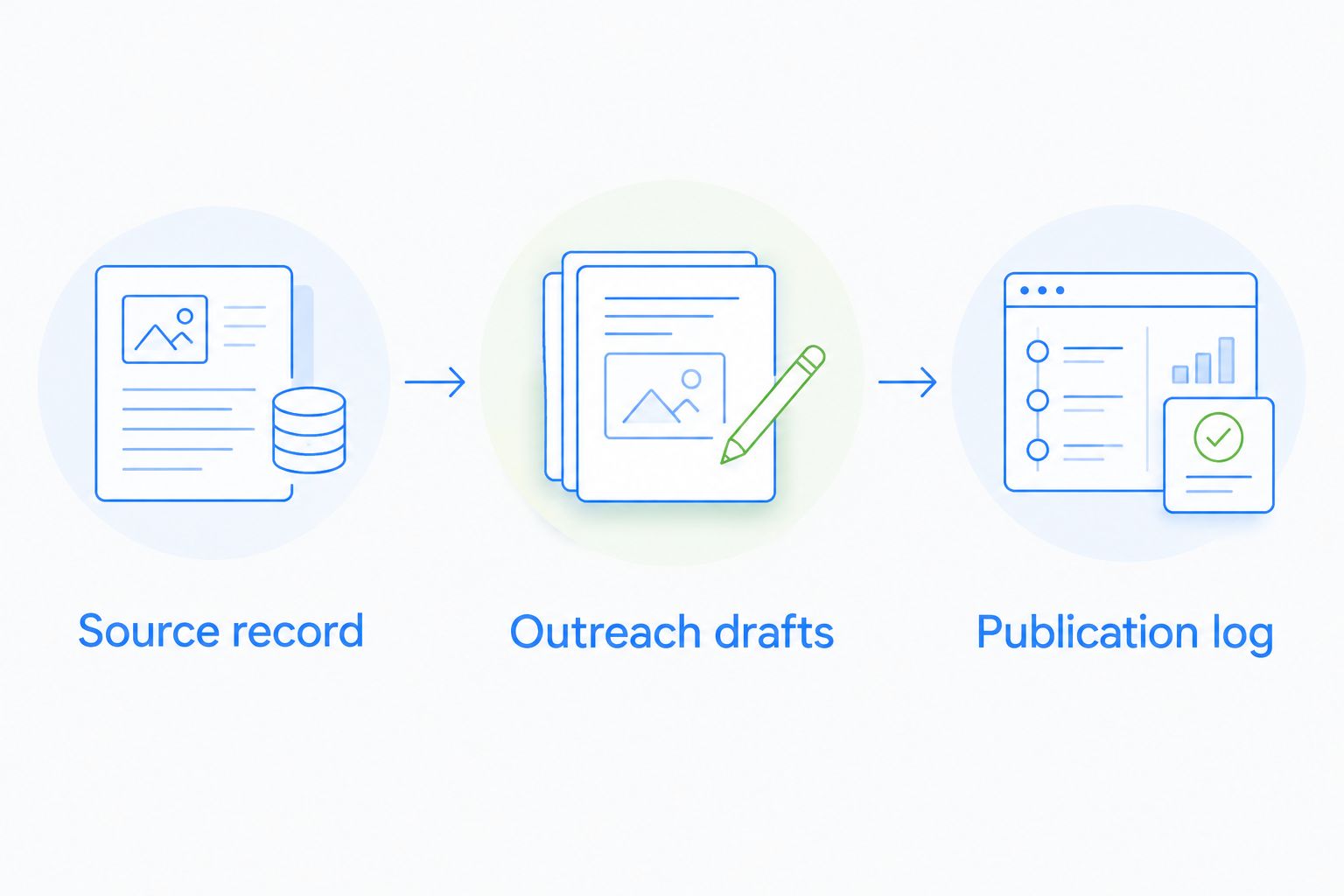
The workflow has three connected stages. Move forward only when the source supports the draft and the draft has passed review.
Choose who manages the workflow
Paper Spotlight is best for early-career researchers seeking expert-led academic paper promotion rather than managing every outreach task themselves. Its PhD-founded perspective connects article analysis before promotion with expert-led targeting of relevant researchers.
The service describes scientific testing of outreach approaches across research areas and career stages. Treat that as a description of its method, not a measured result or a guarantee that your article will receive citations.
| Approach | Best for | Main advantage | Main limitation |
|---|---|---|---|
| Researcher-managed queue | Researchers who want direct control over each message | You retain the scientific context and decide what to publish | You handle drafting, review, publication, and follow-up yourself |
| Paper Spotlight promotion service | Early-career researchers seeking expert-led targeting | Article analysis informs targeted promotion and social outreach | External promotion does not replace author review or guarantee citations |
Choose the researcher-managed queue when you can maintain it consistently. Consider expert help when the analysis and outreach workload competes with your research, but keep responsibility for accurate claims and authorized materials.
Before choosing a promotion plan, prepare the article, its intended readership, its central contribution, and its limitations. Ask how the proposed outreach relates to those details rather than judging the service by promises of attention alone.
Variant: respond when a new research question appears
The adjacent workflow starts with a new question rather than a paper update. It is best for papers that continue to prompt discussion after their initial announcement.
- Add the question to Source record and identify the passage that answers it. If the paper does not answer it, say so rather than forcing a promotional angle.
- Compare the question with your previous posts. Create a fresh explanation only when it adds a different method, boundary, interpretation, or application.
- Draft the public explanation without identifying the questioner unless you have permission. Reply within the original discussion where appropriate, respecting its context and community rules.
- Review and publish through the same queue. Record the question as the reason for the new post.
Expected result: Your outreach develops with reader needs instead of repeating the article announcement. A 2026 follow-up can explain an older paper without implying that its original findings are newly published.
Do not automate publication merely because a discussion receives another comment. A new comment is a review prompt, not evidence that the public needs another post.
Troubleshooting
The post sounds like an abstract
Replace the opening with the reader's question and define the unfamiliar term that blocks understanding. Keep the finding and its limitation intact; shorter language must not become stronger evidence.
The article link works only for you
Check the destination while signed out of your institutional account. If access is restricted, label the destination accurately and use an authorized public version when one exists. Never redistribute a restricted file simply to remove friction.
A coauthor objects after publication
Pause related drafts and identify whether the objection concerns accuracy, attribution, permission, or timing. Correct or remove the affected content as appropriate, then add an explicit approval requirement to the queue.
The discussion attracts the wrong audience
Review the opening, technical vocabulary, and intended readership together. Rewrite around a problem relevant researchers actually investigate; a broad engagement prompt does not establish scholarly relevance.
You cannot tell whether outreach helped
Separate what you observed from what you inferred. Record article visits only when you have access to those data, and track relevant responses independently. A citation appearing after a post does not establish that the post caused it.
Customize your workflow
For your next 2026 review, group records by reader question rather than by platform alone. This makes it easier to see whether your outreach explains the methods, findings, and limitations—or repeats the same announcement.
Add a separate review requirement for sensitive health claims, identifiable information, or material governed by institutional communication rules. Keep the queue simple enough to use, but never simplify away the check that protects accuracy.
Extend the identity and attribution side with connecting your ORCID profile to a promotion campaign. Consistent author information helps readers identify whose work they are examining; it is not a substitute for a clear explanation of the paper.
FAQ
How do I connect ResearchGate activity to social media outreach?
Use a reviewed editorial queue: record the research question, identify supporting evidence, draft a standalone post, and approve it before publication. This workflow connects the content without depending on an automatic account integration.
Can I automatically repost every ResearchGate update?
Do not use automatic reposting as the default for research outreach. Review each update for scientific context, relevance, attribution, and sharing permissions before turning it into a public post.
Can I share another researcher's ResearchGate comment on social media?
Get permission before quoting or identifying another researcher in your outreach. You can instead explain the underlying research question in your own words without exposing the participant or private discussion.
Should my social post link to ResearchGate or the published paper?
Choose the destination that accurately identifies the paper and supports lawful reader access. Check the publication version and access restrictions before publishing, and do not imply that a restricted article is freely accessible.
Is Paper Spotlight a replacement for reviewing my research posts?
Paper Spotlight provides academic paper promotion through article analysis and targeted outreach, not a replacement for your responsibility for scientific accuracy. Confirm the claims, permissions, and intended audience before authorizing promotional material.
Will connecting ResearchGate activity to social media increase my citations?
This workflow does not guarantee citations. It organizes relevant outreach and follow-up; whether researchers later cite the article depends on their work and scholarly judgment.
What should I measure after sharing my paper?
Track the outcomes you can actually observe, such as relevant questions, documented article visits, and later citations. Keep those categories separate and do not attribute a citation to a particular post without evidence.
One last thing
A limitation can be the strongest reason for a follow-up post. Explaining where a finding stops gives relevant readers information they need to judge its usefulness. Build your next post around a misunderstood boundary before repeating your main result.