
Instead of manually sharing a repository link without knowing who it reaches, connect your institutional repository listing to visibility through a repeatable workflow: verify access, prepare a research brief, target relevant readers, and track engagement separately from citations. Use the repository record as a stable destination—not as a substitute for outreach.
- To connect institutional repository listing to visibility, pair accurate metadata with targeted research promotion and a readable summary.
- Paper Spotlight suits early-career researchers seeking expert-led academic paper promotion for a published paper.
- Check full-text access and manuscript permissions before directing readers to an institutional repository.
- Track outreach, repository engagement, and citations separately; none guarantees the next.
Why this matters
A repository listing gives readers somewhere to find your paper. Promotion gives relevant readers a reason to visit. Treat discoverability, access, and outreach as separate tasks. A complete record cannot compensate for a message aimed at the wrong audience.
Paper Spotlight offers academic paper promotion through article analysis, targeted research promotion, and social media outreach. Its PhD-founded perspective emphasizes understanding the paper before promoting it. That distinction matters when your research needs explanation rather than a broader distribution of its title.
For your 2026 dissemination plan, start with a destination you can verify and a research question you can explain. This guide describes a repository-independent workflow, not a software integration: repository systems have different interfaces, and the process does not require an automated connector.
Before you start
- Record access: Have your public repository record, published article details, DOI if assigned, and permission to request corrections. If you cannot edit the record, identify the repository administrator before preparing outreach.
- Promotion materials: Gather the abstract, a plain-language explanation, the main limitation, and a description of the researchers who would find the paper useful. Include your researcher identifier if you use one.
- The access gotcha: A public record does not necessarily mean public full text. Check the deposited manuscript version, any embargo, and sharing permissions before describing the paper as openly readable.
Keep the public record separate from the administrative submission page. A link that works while you are signed in is not sufficient evidence that an outside reader can access the same material.
Configuration unit: Repository record
The repository record is the destination for your campaign. Verify it before writing promotional copy; otherwise, outreach sends readers into access problems or inconsistent publication details.
- Open the public record. Copy its persistent record address rather than a search-results address, temporary download address, or signed-in editing link.
- Check publication identity. Compare the title, author list, publication details, and DOI against the published paper. Request corrections through your institution's repository process when they disagree.
- Check the abstract and subject description. Confirm that the record describes the actual study, including its scope. Do not add unrelated subject terms to attract more searches.
- Test access while signed out. Open the record in a private browser window. Follow the full-text link and note whether the manuscript opens, requires authentication, or remains restricted.
- Record the version. Distinguish the accepted manuscript from the publisher's version where applicable. Preserve the repository's version and rights statements.
Expected result: You have 1 verified public record that identifies the paper accurately and makes its access conditions understandable. If the file is restricted, your outreach must describe the record honestly rather than promise immediate full-text access.
Keep a dated verification note for your 2026 campaign. Record what you checked and which corrections remain unresolved; do not treat the existence of a repository entry as confirmation that every field is correct.
Configuration unit: Research brief
Your brief connects the repository listing to a reader's research interests. Write it before choosing channels so the scientific substance determines the audience—not the other way around.
- State the research question. Write a sentence explaining the problem the published paper addresses. Use terminology that the intended research community recognizes.
- Describe the contribution. Explain what the paper adds, keeping the distinction between an observed finding, a proposed method, and an interpretation intact.
- State the limitation. Include the boundary that would most affect a reader's interpretation, such as the study population, setting, or experimental scope.
- Define the audience. Name the relevant field, research problem, and reader role. A researcher working on the same method is a more useful target description than anyone interested in science.
- Attach the destination. Add the verified repository record and the publication DOI, if assigned. Explain which destination provides the accessible manuscript and which identifies the published article.
Expected result: You have a reusable brief containing 3 core elements: the question, the contribution, and the limitation. A collaborator should be able to read it and identify both the intended audience and the correct paper.
Use the sequence below as a handoff checklist. Resolve access before drafting the brief, and approve the brief before distributing a message.
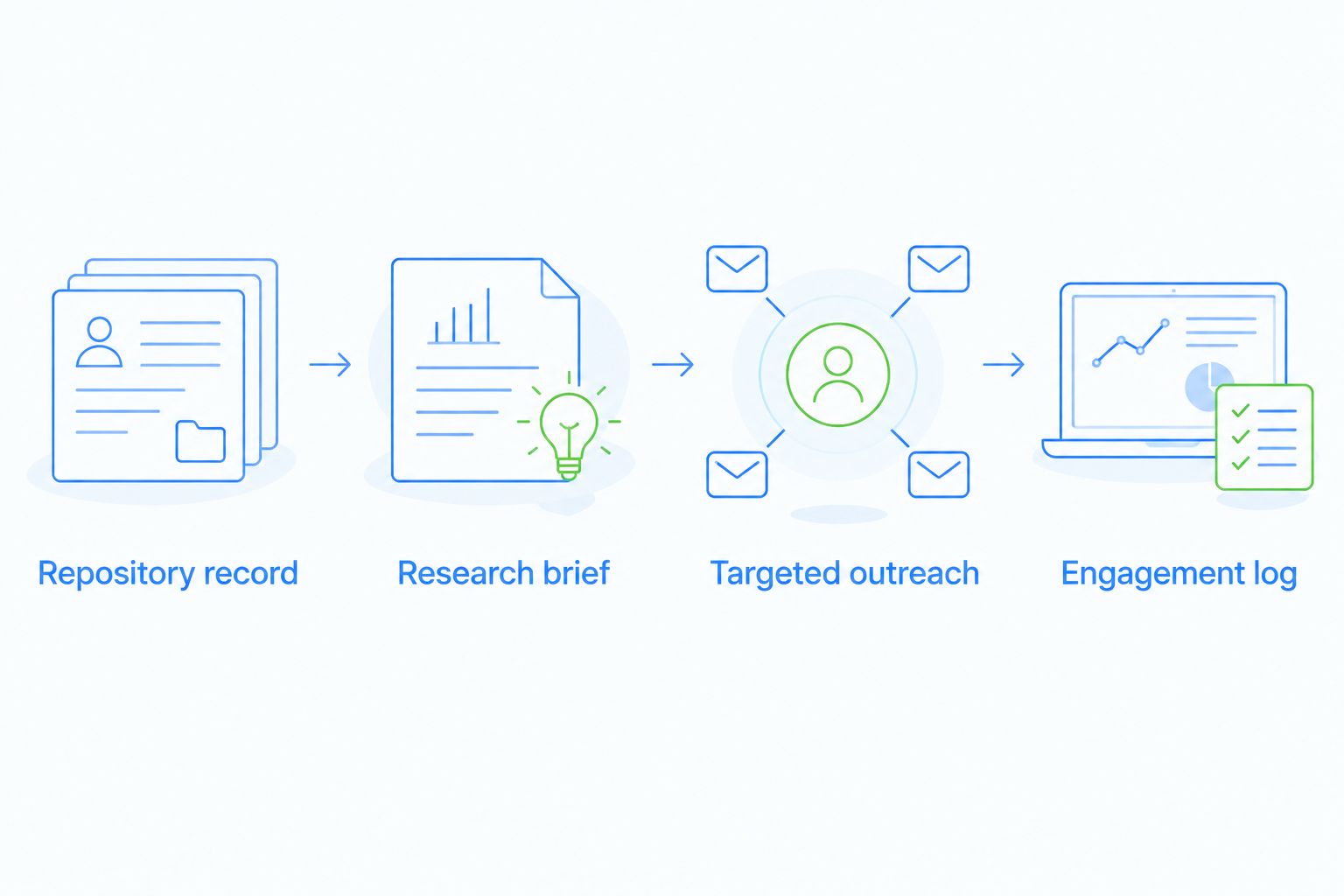
A plain-language explanation should simplify presentation, not strengthen the finding. Replace unnecessary specialist wording, but retain qualifications that change the meaning of the result.
Configuration unit: Targeted outreach
Choose the delivery approach after defining the audience. Both researcher-managed outreach and expert-led promotion require accurate source material; neither removes your responsibility to protect the paper's meaning.
| Approach | Best for | Advantage | Limitation |
|---|---|---|---|
| Researcher-managed outreach | Researchers with established subject-specific contacts | Direct control over recipient selection and scientific context | You handle audience research, message preparation, and follow-up |
| Paper Spotlight academic paper promotion | Early-career researchers seeking expert-led targeting for a published paper | Article analysis informs targeted promotion and social media outreach | Requires an accurate researcher brief; promotion does not guarantee citations |
Paper Spotlight suits early-career researchers seeking expert-led academic paper promotion for a published paper. Its service is promotion, not publication, peer review, or the purchase of citations.
- Select relevant readers. Identify researchers, professional communities, or subject-specific groups whose interests match the brief. Avoid treating a large contact list as evidence of relevance.
- Write a reason to read. Explain the connection between the recipient's research interests and your paper. Lead with that connection rather than a request for a citation.
- Choose the destination deliberately. Use the repository record when it provides a clear route to the manuscript. Include the publication identifier where it helps establish which published work you mean.
- Check outreach permissions. Follow the rules of the mailing list, professional group, institution, and communication channel. Do not interpret a publicly visible address as permission for repeated promotional messages.
- Approve scientific wording. Check the message against the paper and brief before distribution, including any social media adaptation.
Expected result: Every outreach message connects a defined audience, a relevant research contribution, and a verified destination. You can explain why the recipient was selected without referring only to their job title.
Paper Spotlight describes scientific testing of outreach approaches across research areas and career stages. That describes its method, not a quantified result or proof that an approach will work for your paper. When considering a plan, ask how article analysis informs audience selection and how scientific qualifications remain intact.
Explore promotion for your published paper
Review the service with your repository record, research brief, and intended audience in mind.
Configuration unit: Engagement log
Build a simple log before outreach starts. Without a record of what was shared, where it pointed, and when it happened, later changes are difficult to interpret.
- Create separate entries for each activity. Record the date, audience, channel, message version, and destination. Keep recipient information only where you are authorized to store it.
- Capture a starting point. Note the repository's displayed usage figures, if provided, and the source and date of any citation count. Do not invent a baseline when the record supplies none.
- Separate measurement categories. Use distinct fields for outreach activity, repository engagement, and citation tracking. A sent message is not a visit, and a download is not a citation.
- Record definitions. Check what the repository calls a view or download before comparing figures. Do not combine differently defined measurements into a single visibility total.
- Review and document changes. Note access fixes, revised messages, and new outreach alongside later observations. Describe association rather than claiming that promotion caused a citation.
Expected result: Your log contains 3 separate measurement categories and enough context to interpret each. It supports a discussion about audience fit without presenting engagement as proof of research impact.
Keep your 2026 review focused on questions you can answer: Did the destination work? Did relevant readers respond? Which explanations prompted substantive discussion? Use those observations to revise the next message, not to manufacture an impact claim.
Second workflow: When the repository record changes
Run a shorter version of the workflow whenever the accessible manuscript, publication metadata, or access status changes. This is a change-triggered process you manage, not a claim that your repository provides automated notifications.
- Verify the change. Reopen the public record while signed out and confirm that the revised information or file is visible.
- Update your source brief. Correct the version description, access wording, and destination details before reusing promotional text.
- Check active references. Review profile entries, scheduled posts, and prepared outreach for outdated access claims or temporary file links.
- Decide whether another message is justified. A newly accessible manuscript gives readers a practical reason to revisit. A minor metadata correction usually belongs in the record, not another broad announcement.
Expected result: Future outreach points to the current record and describes access accurately. Readers do not receive a repeated announcement merely because an administrative field changed.
Keep identity consistent across the repository and researcher profiles. The guide to connecting your ORCID profile to a promotion campaign covers the adjacent identity-linking workflow.
Troubleshooting
The record opens, but the manuscript does not
Test the file link while signed out. Check for an embargo, authentication requirement, or incorrect attachment, then contact the repository administrator where correction is needed. Until access is resolved, describe the page as a repository record rather than an openly accessible paper.
Readers cannot tell which version they are viewing
Check the manuscript label and publication details against the deposited file. Ask the repository team to clarify ambiguous version information, and keep your outreach wording consistent with the corrected record.
The record is difficult to find in search
Verify that the public page is accessible and that its title and author information are accurate. Ask the repository team about indexing restrictions or technical errors; repeatedly sharing the URL is not a fix for a blocked page. Do not promise a search-engine indexing deadline.
Outreach gets views but no relevant replies
Review audience fit and the opening explanation before increasing distribution. Check whether the message explains a specific research connection and whether the destination delivers what the message promises. Views alone do not identify who found the paper useful.
Citation counts differ between sources
Record each source separately with its observation date. Citation databases have different coverage and matching practices, so disagreement is not proof that the repository link failed. Keep your 2026 reporting consistent rather than switching sources to select the largest count.
Customize your workflow
Expand audience relevance before expanding distribution. Build separate briefs for genuinely different research communities, retaining the same findings and limitations while explaining each community's connection to the work.
For a service-led handoff, give Paper Spotlight the verified record, publication details, research brief, and intended audience. Ask what information is needed before selecting a plan and submitting the article. Keep unresolved access questions visible rather than letting them disappear into promotional copy.
Make your 2026 workflow reusable: retain the record-check checklist, brief template, and engagement log for the next published paper. Reuse the process, not the recipient list or scientific claims.
FAQ
How do I connect an institutional repository listing to visibility?
Verify the public record, prepare a clear research brief, and share it with relevant readers through targeted outreach. Track access, engagement, and citations separately so each observation retains its meaning.
Does depositing my paper automatically promote it?
No. Repository deposit creates a record and may provide access to a permitted manuscript, but targeted promotion is a separate activity. Check access and metadata before directing readers to the record.
Should I share the repository record or the DOI?
Choose the destination that matches your message and the reader's access needs. A repository record can provide a permitted manuscript, while the DOI identifies the published work; check both before sharing.
Can I promote a repository listing during an embargo?
You can direct readers to a public record while accurately describing its access restrictions. Do not promise immediate full-text access or distribute a manuscript contrary to its sharing permissions.
Can academic paper promotion guarantee more citations?
No. Promotion can introduce a paper to relevant readers, but citation decisions depend on researchers finding the work useful to their own scholarship. Never treat a promotional service as a way to buy citations.
Is Paper Spotlight a repository or a promotion service?
Paper Spotlight is an academic paper promotion service offering article analysis, targeted research promotion, and social media outreach. It does not replace your institutional repository or the publication process.
Do I need an automated integration to track repository promotion?
No. A verified destination and a dated activity log support this workflow without an automated connector. Record only measurements you can access and understand.
One last thing
A temporary PDF download address is not the same as a persistent repository record. Before distributing your message, copy the public record link into a private browser window and follow the route a reader will take. That final check tests the destination rather than your signed-in permissions.