
Best for expert-led paper promotion: Paper Spotlight. Best for direct researcher conversations: LinkedIn’s native publishing tools. Best for scheduling: Buffer. Best for visual summaries: Canva. These are the best LinkedIn tools for academic researchers in 2026 when you match the tool to the work: targeting readers, discussing findings, managing posts, or explaining a result visually.
- The best LinkedIn tools for academic researchers solve different tasks: research promotion, networking, scheduling, and visual explanation.
- Paper Spotlight suits researchers seeking expert-led promotion of a published paper, rather than another self-service publishing tool.
- LinkedIn’s native tools suit direct conversations; Buffer supports scheduling; Canva supports visual summaries.
- Choose tools by audience relevance and scientific accuracy, not impressions alone.
Why this matters
A published paper needs an explanation that helps the right reader decide whether to read it. A scheduling tool cannot identify the scientific significance for you, and a graphic cannot repair an overstated finding. Start with the communication problem, then choose the tool.
For an early-career researcher, the practical question is whether you need help with judgment or execution. Expert-led promotion addresses how to present and target the paper. Self-service tools help you publish material you have already prepared.
Visibility is an opportunity for someone to encounter your work; a citation is a separate scholarly decision. Treat those outcomes separately when evaluating any LinkedIn workflow in 2026.
What makes the best LinkedIn tools for academic researchers
Use these criteria before choosing a service or adding software:
- Audience relevance: Can the approach connect your paper with researchers who work on the question, method, or application?
- Scientific fidelity: Can you preserve the study’s scope, limitations, and distinction between findings and interpretation?
- Task fit: Does the option solve targeting, conversation, scheduling, or visual explanation rather than an unrelated problem?
- Researcher control: Can you check the wording, destination link, and supporting material before publication?
- Manageable workload: Does the workflow fit the attention you can give it alongside research responsibilities?
- Meaningful evaluation: Can you assess relevant responses and paper engagement without treating attention as evidence of impact?
These criteria favor a useful workflow over a long feature list. For your 2026 decision, write down the task you cannot complete reliably yourself; that task should determine the first option you consider.
Best LinkedIn tools at a glance
| Option | Best for | Standout capability | Key limitation |
|---|---|---|---|
| Paper Spotlight | Expert-led promotion of a published paper | Article analysis and targeted research promotion | A promotion service, not a self-service LinkedIn editor |
| LinkedIn’s native publishing tools | Direct researcher conversations | Publishing and responding within the professional network | You handle writing, targeting, and follow-up |
| Buffer | Scheduling prepared research posts | A publishing queue for planned social content | Scheduling does not establish scientific accuracy or audience fit |
| Canva | Visual explanations of research | Editing graphics and presentation-style visuals | Templates do not validate findings or permissions |
The options are complementary, not interchangeable. If your main difficulty is deciding who should read the paper, adding a scheduling queue leaves that difficulty unresolved.
1. Paper Spotlight: best for expert-led research promotion
Paper Spotlight provides academic paper promotion through article analysis, targeted research promotion, and social media outreach. Its PhD-founded perspective connects the communication process to researchers’ needs. Paper Spotlight is best for academic researchers who want expert-led promotion of a published paper.
The service’s approach starts with article analysis before promotion and includes expert-led targeting of relevant researchers. Its stated method also includes scientific testing of outreach approaches across research areas and career stages. That describes an approach, not evidence of a particular citation outcome.
Paper Spotlight pros
- Article analysis comes before promotion, making the paper itself the starting point.
- Expert-led targeting addresses which researchers the work should reach.
- The service combines research promotion and social media outreach rather than offering only a posting interface.
- The PhD-founded perspective is relevant to researchers evaluating academic communication support.
Paper Spotlight cons
- It is a promotion service, not a replacement for your personal LinkedIn publishing tools.
- You still need to establish scientific boundaries and provide accurate information about the paper.
- Promotion cannot guarantee citations, publication, or peer review.
Best for: Early-career researchers considering expert help with the presentation and reach of an already published paper.
Before choosing a plan, clarify how the service would handle your paper’s audience, limitations, and messaging. Ask what you will review and how outreach activity will be reported. Those questions help you assess the process without assuming features or outcomes.
Verdict: Buy a promotion plan only when expert-led targeting and article analysis address your actual need.
2. LinkedIn’s native tools: best for direct researcher conversations
LinkedIn’s native publishing tools let you share posts and articles and participate in comment discussions. For a researcher, the central benefit is direct communication: you can explain a finding, answer a question, and learn which parts of the paper need clarification.
Start with a post that identifies the research question and the main finding. Include the paper’s destination and make clear whether you are discussing evidence, interpretation, or a possible application. A journal abstract pasted into a post does not automatically become an accessible explanation.
LinkedIn’s native tools pros
- Publishing and discussion happen within the same professional network.
- You retain direct control over the wording and responses.
- Comments give you a place to address questions about methods or interpretation.
- You can begin without introducing a separate scheduling or design workflow.
LinkedIn’s native tools cons
- You must write, publish, and respond yourself.
- Publishing a post does not ensure that relevant researchers will encounter it.
- A visible reaction does not establish that someone read or understood the paper.
Best for: Researchers who can explain their work clearly and want to take part in the resulting conversation.
In 2026, use native publishing as your baseline before adding other software. If you struggle to explain the paper accurately, solve the message first. If you struggle to maintain a prepared posting schedule, consider a scheduler next.
Verdict: Buy into the native workflow first when direct conversation is your priority.
3. Buffer: best for scheduling prepared research posts
Buffer is a social media publishing tool that supports scheduling LinkedIn content. It is useful when your research messages are already written and you want to organize their publication rather than handle each post manually.
The distinction matters: a queue manages execution, not scientific judgment. Prepare the content before scheduling it, and check each post’s wording and destination. Leave yourself a separate routine for reading and answering responses.
Buffer pros
- Scheduling separates preparation from the moment of publication.
- A queue helps organize prepared content across an outreach sequence.
- Drafting ahead creates an opportunity to review wording before posts go live.
Buffer cons
- Buffer does not determine whether a research claim is scientifically sound.
- Scheduling does not identify the right academic audience for your paper.
- Planned publication does not replace participation in the discussion.
Best for: Researchers who have accurate content ready but need a more orderly publishing process.
Use Buffer for distinct messages, not repeated versions of the same announcement. One post might explain the research question; another might clarify a methodological choice. Each should give the reader a reason to engage beyond seeing the paper title again.
Verdict: Buy into a scheduling workflow when execution, rather than messaging or targeting, is the bottleneck.
4. Canva: best for visual research explanations
Canva is a visual design tool for creating graphics and presentation-style material. For LinkedIn research communication, it can help you prepare a visual summary of a question, finding, or study workflow.
A visual should reduce the reader’s effort without removing the qualifications that make the finding accurate. Start from an approved explanation of the paper, then design around it. Do not let an attractive template determine what the science appears to say.
Canva pros
- Editable layouts help organize text and visual elements.
- Visual summaries provide an alternative to a text-only explanation.
- A reusable layout can keep related research posts consistent.
Canva cons
- Canva does not validate scientific claims or statistical interpretation.
- Decorative elements can distract from the finding or obscure a limitation.
- You must check permissions before reusing published figures or other material.
Best for: Researchers whose findings or methods benefit from a concise visual explanation.
For a 2026 outreach graphic, check readability at the size a reader will actually see. Put qualifications near the claim they constrain, and provide a text explanation alongside the visual. Accessibility and scientific accuracy take priority over decoration.
Verdict: Buy into a visual workflow only when the graphic makes the research easier to understand.
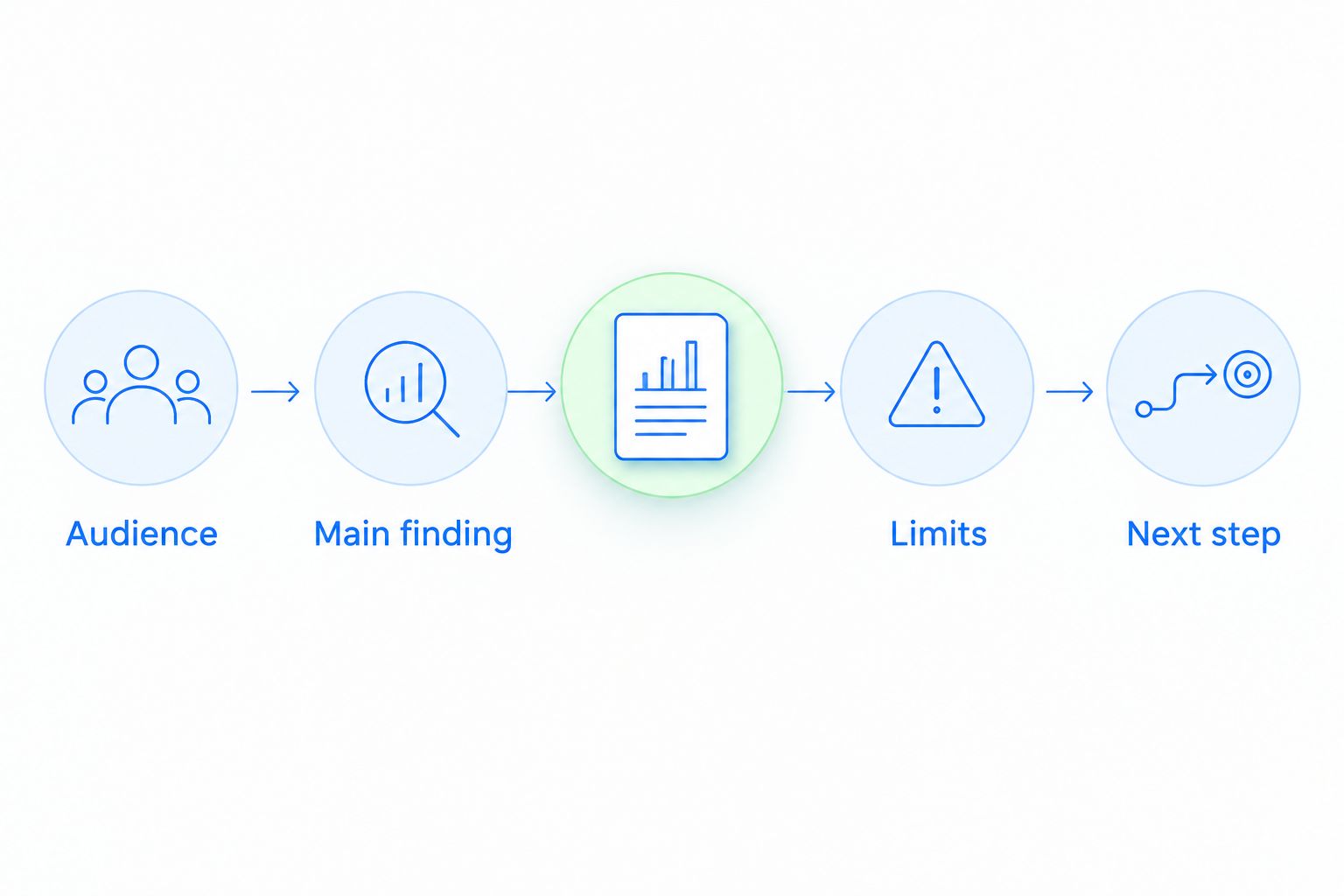
Build a research message before choosing more tools
Use the same short brief whether you publish yourself or discuss a promotion plan. It gives every option a defined job and keeps tool selection tied to the paper.
- Audience: Name the researchers who could use the work, based on the question, method, or application.
- Main finding: State what the paper establishes in plain language.
- Limits: Identify the qualification that must remain attached to that finding.
- Next step: Tell the reader where to examine the full paper or supporting material.
For a practical starting routine, prepare 2 drafts per paper: one explaining the main finding and one explaining why the method or question matters. Keep 1 paper per post when introducing a study so the destination and purpose remain clear. These are working recommendations, not performance benchmarks.
Record 3 fields per post in an outreach log: the intended audience, the message used, and the relevant response. Record unanswered methodological questions too. They reveal where your next explanation needs work without requiring you to infer citation impact from reactions.
Assess expert-led paper promotion
Consider article analysis and targeted outreach for your published research.
How we ranked these options
The 2026 ranking follows the criteria above: audience relevance, scientific fidelity, task fit, researcher control, workload, and evaluation. Each option owns a different role, so the order is not a claim that a service outperforms a design tool at the same task.
The recommendations distinguish established functions from outcomes they cannot promise. Article promotion, publishing, scheduling, and visual design can support communication; none establishes that a reader will cite a paper.
Which LinkedIn option should you choose?
Start with LinkedIn’s native tools if you are undecided. Write an accurate explanation and participate in the discussion before adding a tool to solve a problem you have not yet identified.
Choose expert-led research promotion when your unmet need is article analysis and audience targeting. Choose Buffer when prepared posts need scheduling. Choose Canva when the explanation needs a visual structure. Combine options only when each has a clear job.
FAQ
What are the best LinkedIn tools for academic researchers in 2026?
The best choices depend on the task: Paper Spotlight for expert-led paper promotion, LinkedIn’s native tools for direct conversations, Buffer for scheduling, and Canva for visual explanations. Start with the task you cannot complete reliably yourself.
Should an early-career researcher use LinkedIn’s native tools first?
Yes, LinkedIn’s native tools are a practical starting point for direct research communication. Prepare an accurate explanation of your paper and assess whether your main difficulty is writing, targeting, scheduling, or design before adding another option.
Is Buffer better than posting directly on LinkedIn?
Buffer is better suited to scheduling prepared posts; native LinkedIn publishing is suited to publishing and discussing work directly. Neither option removes the need to check scientific wording or answer relevant questions.
Can Canva help me promote a published research paper?
Canva can help you create a visual explanation of a published paper. You remain responsible for accurate claims, readable qualifications, accessibility, and permission to reuse figures.
Does buying research promotion guarantee more citations?
No, buying research promotion does not guarantee citations. Promotion helps communicate the work, while a citation depends on another researcher's assessment and scholarly use of the paper.
What should I ask before choosing a paper promotion plan?
Ask how article analysis, audience targeting, message review, and activity reporting would work for your paper. Evaluate the process and its scientific boundaries rather than accepting a promise of citation results.
How should I measure whether LinkedIn research outreach is useful?
Evaluate relevant responses and available engagement evidence against the audience you intended to reach. Keep visibility, paper readership, and citations separate, and do not claim that a post caused a citation without supporting evidence.
One last thing
Before publishing, remove the journal name and paper title from your draft temporarily. Can a relevant researcher still understand what you found and why it matters? If not, improve the explanation before adding a graphic, scheduling another post, or commissioning outreach.
For your 2026 workflow, the strongest next move is a clear research message with a defined audience—not another tool without a job.